Setting the normal mode
NOTE:
The engine speed, coolant temperature, and fault code, if detected, can be displayed on the LCD of the FI diagnostic tool when the tool is connected to the vehicle and is set to the normal mode.
1. Set the main switch to "OFF" and the engine stop switch to " ".
2. Disconnect the self-diagnosis signal connector "1", and then connect the FI diagnostic tool "2" as shown.
3. Set the main switch to "ON" and start the engine.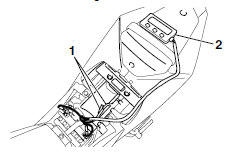
NOTE:
- The coolant temperature and engine speed appear on the LCD of the FI diagnostic tool.
- "POWER" LED (green) comes on.
- If a malfunction is detected in the system, the "WARNING" LED (orange) comes on.
4. Stop the engine.
NOTE:
If a malfunction is detected in the system, the fault code appears on the LCD of the FI diagnostic tool and the "WARNING" LED (orange) comes on. 
5. Set the main switch to "OFF" to cancel the normal mode.
6. Disconnect the FI diagnostic tool and connect the self-diagnosis signal connector.
Test yourself
A quick Yamaha YZF-R125 quiz: every answer comes with an explanation and a link to the manual page.