Instruments et commandes
Écran tactile
Dans ce manuel : Instruments et commandes
~1min de lecture
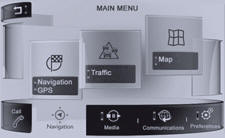


Appuyer sur MENU pour afficher le MENU PRINCIPAL, puis sélectionner « Réglages ».

Sélectionner « Configuration du système ».

Sélectionner « Date & Heure ».


Sélectionner la date ou l'heure affichée, utiliser le clavier pour régler, puis « Confirmer ».
Testez-vous
Un quiz rapide sur Peugeot 208 : chaque réponse est expliquée, avec un lien vers la page du manuel.
Cette page vous a-t-elle été utile ?