Настройки для спутникового радио Siriusxm®
There are numerous settings that can be made to enhance your SiriusXM® Satellite radio listening experience.
Настройки
Drag down the top view and tap on Settings  Media
 SiriusXM. The following alternatives will be displayed:
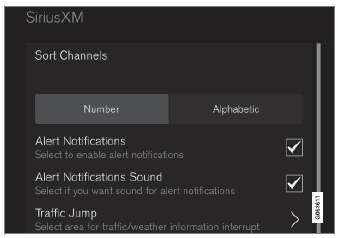
Трафик прыжок
Tap to display a list of cities from which you can choose to get traffic/weather information (or Трафик выпрыгнет to deactivate the feature). Tap to select a city (Прыгать will be displayed on the Home screen next to Библиотека). Tap Назад to return to the list of settings or Close to return to the Home screen.
From the Home screen, tap Прыгать to activate the function. When traffic/weather information is available from the selected city, the radio will automatically tune to the channel providing the information. When the information/ announcement is finished, the radio will automatically return to the channel that you were previously listening to.
During an announcement, tap Прыгать to interrupt the message and return to the station that you were currently listening to.
Нажмите на коробку, чтобы активировать/деактивировать. When activated, you will be notified if a song, artist, etc. То, что вы выбрали, играет. You will be asked if you want to listen.
Уведомления о предупреждении звучат
Выберите, чтобы получить слышимое предупреждение, когда играется один из выбранных вариантов.
Сортировки каналов
Выберите, как сортировать список каналов.
iTunes Taging
Tap to display a menu with the options: iTunes Taging and Список тегов. With this feature activated, songs can be tagged for later purchase from the iTunes store.
Игровые оповещения
Нажмите, чтобы отобразить список видов спорта.
Tap a sport to display a list of teams and tap a box on the right side of the screen to select a team as a favorite. An alert will then be provided when information about the team is being broadcast.
Tap Подтверждать below the list to return to the list of sports.
Tap Назад to return to the list of settings or Закрывать to return to the main screen.
Неозабеженные услуги
If you have a SiriusXM® Satellite radio subscription, any channels not included in the subscription will be listed here. Позвоните Siriusxm ™, чтобы подписаться. The phone number will be shown on the screen. If a cell phone is paired and connected to the vehicle, tap the phone number to make the call.
Пропущенные станции
Нажмите, чтобы отобразить список каналов, которые вы хотели бы пропустить (скрыть). Hide channels from the channel list by tapping the boxes to the right of the screen. Skipped (hidden) channels will not be shown in the channel list. However, a channel previously selected as a favorite will still be displayed in the list of favorites, even it has been added to the skip list.
Пропущенные категории
Нажмите, чтобы отобразить список категорий. Нажмите на категорию, чтобы пропустить (скрыть). It will not be displayed in the list of categories.
Проверьте себя
Короткий тест по Volvo XC90: после ответа — пояснение и ссылка на страницу руководства.