Аудио, медиа и интернет
Изменяющаяся волновая полоса и радиостанция
Место в руководстве: Аудио, медиа и интернет
3шагов
~18мин
2/5сложность
Выполнено 0 из 3
Instructions for changing wavebands, waveband lists and radio stations in the selected list are provided here.
Изменение полосы волн
Swipe from App view on the center display and select the desired waveband (e.g. Фм) or open the App menu in the instrument panel with the right-side steering wheel keypad and make your selection there.
Изменение списка в полосе волн
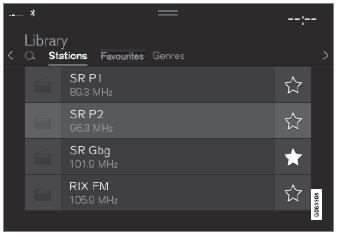
- Tap Библиотека.
- Select playback from Станции, Фавориты or Жанры.
- Нажмите на желаемую станцию в списке.
Фавориты – only plays selected favorite channels.
Жанры - only plays channels broadcasting the selected genre or program type, e.g. pop, classical, etc.
Изменение радиостанций в выбранном списке
- Press
 or
 under the center display or on the right-side steering wheel keypad.
- Переместите шаг за шагом через выбранный список.
It is also possible to change radio station in the selected list via the center display.
Проверьте себя
Короткий тест по Volvo XC90: после ответа — пояснение и ссылка на страницу руководства.
Страница помогла?