Аудио, медиа и интернет
Спутниковое радио Siriusxm®
Место в руководстве: Аудио, медиа и интернет
7шагов
~42мин
2/5сложность
Выполнено 0 из 7
The SiriusXM® Satellite system broadcasts from of a number of high elevation satellites in geosynchronous orbit.
Слушание спутникового радио
The digital signals from the satellites are lineof- sight, which means that physical obstructions such as bridges, tunnels, etc, may temporarily interfere with signal reception.
Avoid any obstructions, such as metallic objects transported on roof racks or in a ski box, or other antennas that may impede signals from the SiriusXM® satellites.
Выбор спутниковой радиоприемники Siriusxm®
- From the center display's Home view, swipe from right to left to come to App view.

- Коснитесь значка спутникового радио Siriusxm®.
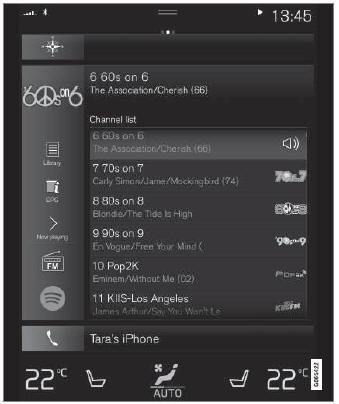
Домашний вид со спутниковым радио Siriusxm® активированным
If there is no subscription activated, tap channel 1, where you will be prompted on the screen to phone SiriusXM®.
If a cell phone is paired and connected to the vehicle, you can also subscribe by:
- Из домашнего обзора потяните меню настроек.
- Откройте меню «Настройки» для спутникового радио Siriusxm®.
- Tap Неозабеженные услуги.
- Чтобы позвонить Siriusxm®, введите номер телефона. They will activate the subscription of your choice. Это может занять несколько минут.
- When the subscription has been activated, tap the SiriusXM® Satellite radio icon to start the function and display the channel list included in your subscription.
Проверьте себя
Короткий тест по Volvo XC90: после ответа — пояснение и ссылка на страницу руководства.
Страница помогла?