Driver assistance
Cruise control system
In this manual: Driver assistance
~2min read
Switching on
Applies to: vehicles with cruise control system
The cruise control system makes it possible to drive at a constant speed starting at 30 km/h.
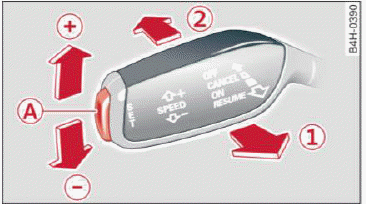
Fig. 88 Operating lever: cruise control system
- To switch the cruise control on, pull the lever into position 1
 fig. 88.
- Drive at the speed to be maintained.
- To store the speed, press the button A.
The stored speed and the  (USA models) /
 (Canada models) indicator light are displayed in the instrument cluster.
This information is also shown briefly in the Head-up display.
The speed is maintained by modifying engine power or through an active brake intervention.
WARNING
- Always pay attention to the traffic around you when the cruise control system is in operation.
You are always responsible for your speed and the distance between your vehicle and other vehicles.
- For safety reasons, cruise control should not be used in the city, in stop-and-go traffic, on winding roads and when road conditions are poor (such as ice, fog, gravel, heavy rain and hydroplaning), because this increases the risk of an accident.
- Switch the cruise control off temporarily when driving in turning lanes, highway exits or in construction zones.
- Please note that unconsciously "resting" your foot on the accelerator pedal prevents the cruise control from braking. This is because pressing the accelerator pedal overrides the cruise control system.
- If a brake system malfunction such as overheating occurs when the cruise control system is switched on, the braking function in the system may be switched off. The rest of the cruise control system functions remain active as long as the
 (USA models) /
 (Canada models) indicator light is on.
Tips
The brake lights turn on when the brakes are applied automatically.
Was this page helpful?