In curves
Applies to: vehicles with Audi adaptive cruise control
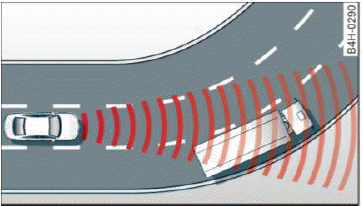
Fig. 91 Example: driving into a curve
When driving into a curve  fig. 91 and out of a curve, the adaptive cruise control may react to an object in the neighboring lane and apply the brakes. You can prevent that by pressing the accelerator pedal briefly.
Stationary objects
Applies to: vehicles with Audi adaptive cruise control
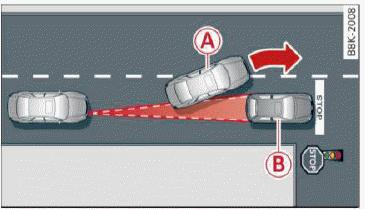
Fig. 92 Example: object changing lanes and stationary object
The adaptive cruise control system only reacts to objects that are moving or that the system has already detected as moving. For example, it can react when a vehicle that has already been detected A turns or changes lanes, but adaptive cruise control does not react to a stationary vehicle B.
Switching on/off
Applies to: vehicles with Audi adaptive cruise control
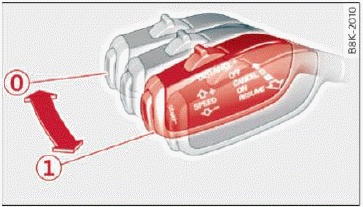
Fig. 93 Operating lever: switching on and off
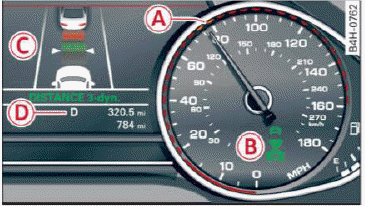
Fig. 94 Instrument cluster: adaptive cruise control
You can set any speed between 30 km/h and 150 km/h.
Indicator lights and messages in the instrument cluster display inform you about the current situation and setting.
An additional indicator appears in the Head-up display.
Switching adaptive cruise control on
- Pull the lever toward you into position 1 fig. 93. ACC: standby appears in the display.
Saving the speed and activating regulation
- To save the current speed, press the [SET] fig. 93 button. The stored speed is shown in the speedometer in the LED line A and appears briefly in the information line D fig. 94.
- To activate the regulation while stationary, also press the brake pedal.
Switching adaptive cruise control off
- Push the lever away from you into position 0 until it clicks into place. The message ACC: off appears.
B - Indicator lights
 - adaptive cruise control is switched on. No objects are detected ahead. The stored speed is maintained.
 - An object ahead was detected. The adaptive cruise control system regulates the speed and distance to the object ahead and accelerates/ brakes automatically.
 - adaptive cruise control is switched on. An object ahead was detected. Your vehicle remains stopped and will not start driving automatically.
 - The automatic braking is not enough to maintain a sufficient distance to an object ahead.
C - Instrument cluster display
If adaptive cruise control is not shown in the instrument cluster display, you can call it up using the multifunction steering wheel buttons.
Based on the graphics in the display, you can determine if the system is maintaining a distance to the object ahead and what that distance is.
No vehicle - No object ahead was detected.
White vehicle - An object ahead was detected.
Red vehicle - Request for driver intervention.
Both arrows on the scale C indicate the distance to the object ahead. No arrow appears when the vehicle is on an open road and there is no object ahead. If an object is detected ahead, the arrow moves on the scale.
The green zone on the scale indicates the store distance. For information on changing the distance. If the distance selected is exceeded or not reached, the arrow moves into the red zone on the scale.
WARNING
If you press the [SET] button when driving at speeds below 30 km/h, the vehicle accelerates automatically up to 30 km/h, which is the minimum speed that can be set.
Tips
- If you switch the ignition or the adaptive cruise control system off, the set speed is erased for safety reasons.
- The electronic stabilization control (ESC) and the anti-slip-regulation (ASR) are automatically switched on when the adaptive cruise control is switched on.