Night vision assist with pedestrian and wild animal detection
Description
Applies to: vehicles with night vision assist
The night vision assist can detect, highlight and, if necessary, worn about pedestrians and large wild animals.
Night vision assist with pedestrian and wild animal detection assists you at night by using an infrared camera to monitor the area in front of your vehicle, within the limits of the system. It can display objects up to a distance of approximately 1000 feet (300 m). The thermal image detected by the camera is shown in the instrument cluster display. Warm areas appear lighter and cold areas appear darker.
Highlighting detected pedestrians and wild animals
Applies to: vehicles with night vision assist

Fig. 109 Instrument cluster: yellow highlighted pedestrians
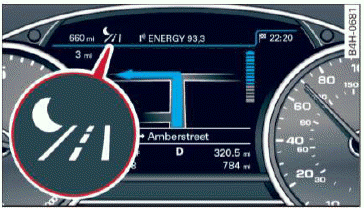
Fig. 110 Instrument cluster: symbol when the infrared image is not visible
Within the Limits of the system, the night vision assist can detect pedestrians and wild animals that are between approximately 32 ft (10 m) and 295 ft (90 m) in front of the vehicle and within the detection zone. Within the limits of the system a pedestrian or wild animal detected when the low beams are switched on is highlighted in yellow  fig. 109. Animal recognition is not active within highly developed areas.
The system only detects large wild animals such as deer.
Tips
If another display such as navigation replaces the image from the night vision assist the  symbol appears in a tab fig. 110. You can access night vision assist using the multifunction steering wheel buttons.
Pedestrian and wild animal warning
Applies to: vehicles with night vision assist
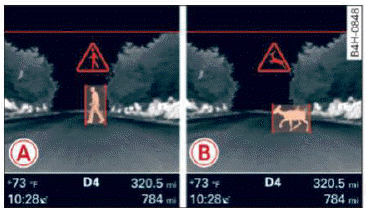
Fig. 111 Instrument cluster: A pedestrian warning, B wild animal warning
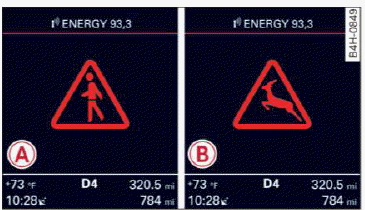
Fig. 112 Instrument cluster: A pedestrian warning/ B wild animal warning, when the night vision assist image is not selected in the instrument cluster display
Image in the instrument cluster/head-up display
If there are pedestrians or wild animals in an area in front of your vehicle that is classified as critical, the system will direct your attention to this:
- Pedestrians or wild animals are highlighted in red and the corresponding symbol
 or
 turns on fig. 111.
- There is also an audible signal.
The area classified as critical is based on the vehicle speed and the steering wheel angle. Pedestrian and wild animal warning encourages you to pay more attention.
If the night vision assist image is replaced by another display (such as the on-board computer), the red or indicator light fig. 112 will appear if there is a pedestrian or wild animal warning.
If the head-up display is switched on and the night vision assist content is activated, or will appear in the head-up display.
Marking light
To direct the driver's attention to a pedestrian, the headlights can flash on the pedestrian three times in a row when there is a pedestrian warning.
This occurs at speeds above approximately 60 km/h if you are outside of illuminated areas and no detected vehicles are shown. The high beam assistant controls the marking light.
The marking light is not used for wild animals.
General information
Applies to: vehicles with night vision assist
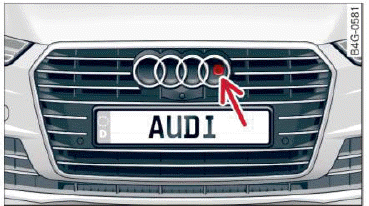
Fig. 113 Front of the vehicle: night vision assistant camera
The following situations may affect the function of the night vision assist system:
- Poor visibility such as snow, rain, fog or heavy spray
- Dirty lens on the night vision assist camera
Make sure the night vision assist camera fig. 113 is not covered by stickers, deposits or any other obstructions because that can affect the camera function. For information on cleaning.
The pedestrian and wild animal recognition depends on the temperature difference between the person/wild animal and the background. People/ wild animals may not be detected if the difference is too small. The pedestrian/wild animal marking and the marking light deactivate at temperatures above approximately 77 ºF (25 ºC) and during daylight. If the night vision assist image is selected in the instrument cluster display, then the  symbol appears at the top on the right side.
WARNING
Pay attention to traffic and the area around your vehicle when night vision assist is switched on. The driver is always responsible for assessing the traffic situation.
- Night vision assist can only warn about people and wild animals located within the visual range of the infrared camera. The visual range corresponds to the image in the instrument cluster display.
- Night vision assist may not detect people or wild animals and mark them if
- they are not in an upright position, for example if they are sitting or lying down and/or
- the silhouette in the display appears incomplete or interrupted, for example because the person is partially covered by a vehicle or an animal by tall grass. This could increase the risk of an accident.
- Never try to swerve around animals if doing so will endanger you or other road users, because this increases the risk of an accident.
Tips
- Even though the system evaluates the shape and heat given off by all detected objects, there are limits to the system. There may be false warnings.
- For technical reasons, the image pauses in split second intervals.
Switching on/off
Applies to: vehicles with night vision assist
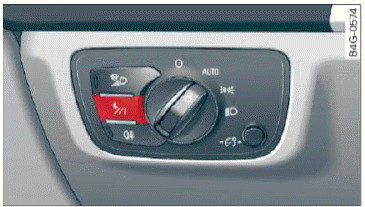
Fig. 114 Area around the light switch: night vision assistant button
Requirement: switch the ignition on and turn the light switch to the AUTO position.
- Press the
 button fig. 114. The heat image from the night vision camera appears in the instrument cluster display.
- Press the
 button again to switch the night vision assist off.
If conditions are bright enough, night vision assist can be switched on without moving the light switch to the AUTO position. Pedestrian and wild animal highlighting and warnings are only active when it is dark outside and the headlights are switched on.
Adjusting the contrast
Applies to: vehicles with night vision assist
- Select: the [CAR] function button > (Car) Systems control button > Driver assistance > Night vision assist contrast.
When the night vision assist is switched on and the image is visible in the instrument cluster display, you can adjust the contrast in the image from Min to Max.
Messages
Applies to: vehicles with night vision assist
Night vision assist: System fault
The system cannot guarantee correct function and is switched off. See an authorized Audi dealer or authorized Audi Service Facility for assistance.
Night vision assist: Currently unavailable
The system cannot guarantee correct function at this time and is switched off.
Night vision assist: Only available at night with lights turned on
Night vision assist only works when it is dark outside and the headlights are on.
Night vision assist: Pedestrian marking currently unavailable
The pedestrian and wild animal marking was switched off by the system.