View in instrument cluster display
Applies to: vehicles with Audi active lane assist

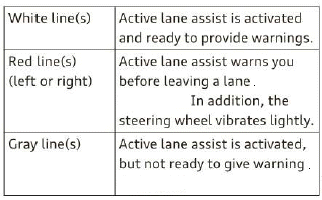
Fig. 102 Instrument cluster: active lane assist is switched on and providing warnings
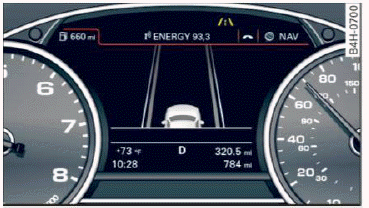
Fig. 103 Instrument cluster: active lane assist is switched on but not ready to provide warnings
You can call up the active lane assist display using the buttons in the multifunction steering wheel.
An additional indicator appears in the Head-up display.
Messages in the instrument cluster display
If the active lane assist switches off automatically, the indicator light in the display turns off and one of the following messages appears:
Audi active lane assist: Currently unavailable.
No camera view
This message appears if the camera is unable to detect the lines. This could happen if:
- The camera field of view
 fig. 101 is dirty or covered in ice. Clean this area on the windshield.
- The camera field of view is fogged over. Wait until the fog has cleared before switching the active lane assist on again.
- The system has been unable to detect the lanes for an extended period of time due to road conditions.
Switch active lane assist back on when the lines are more visible.
Audi active lane assist: Currently unavailable
There is a temporary active lane assist malfunction.
Try switching the active lane assist on again later.
Audi active lane assist: System fault!
Drive to an authorized Audi dealer or authorized Audi Service Facility immediately to have the malfunction corrected.
Audi active lane assist: Please take over steering
This message appears if you are not steering by yourself. If this is the case, active lane assist does not switch off, but it is "not ready" to provide a warning. The system can help you keep the vehicle in the lane. However, you are responsible for driving the vehicle and must steer it yourself.
Adjusting the vibration warning
Applies to: vehicles with Audi active lane assist
- Select: the [CAR] function button > (Car) Systems control button > Driver assistance > Audi active lane assist.
Vibration warning
You can switch the additional vibration warning in the steering wheel on or off.
Tips
Your settings are automatically stored and assigned to the remote control key being used.