Connection
Open the covers of the center armrest.
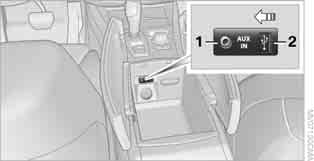
1 Line input: 3.5 mm jack
2 USB port
iPod
To connect an iPod, use the BMW adapter cable for Apple iPod.
For detailed information, contact a BMW service center or visit the website:
www.bmw.ru To play sound through the vehicle speakers, connect the iPod to sockets 1 and 2.
The iPod menu structure is supported by the USB/Audio port.
USB device
 Use a flexible adapter cable to connect the device. This is important to protect the USB port and the USB device from mechanical damage.◄ To play audio through the vehicle speakers, connect the USB device to socket 2.
When a USB device is connected for the first time, additional information about all files (for example, artist, genre) and playlists are transferred from the USB device to the vehicle. This process may take some time. The duration depends on the USB device and the number of files.
While the information is being transferred, files can be selected by name and by folder.
When the information has been transferred, files can be selected by additional information and via playlists.
Information for up to 20,000 files from four USB devices can be stored in the vehicle.
When a fifth USB device is connected or the number of files exceeds 20,000, the stored information may be deleted to make room for new files.
 Recordings protected by DRM (Digital Rights Management) may not play.◄
Test yourself
A quick BMW X3 quiz: every answer comes with an explanation and a link to the manual page.