Entertainment
Selecting a track
In this manual: Entertainment
~1min read
Tracks (files) can be selected via playlists and additional information.
On USB devices, files can also be selected via the folder structure. Track names are displayed if they are written in Latin letters.
1. Select the desired item, for example "Playlists" or "Artists", and press the controller.

2. Select a track and press the controller.
Displaying file information
You can display information on compressed audio files, such as the artist name or album title.
1. During playback, press the controller.
2. Select "Details" and press the controller.
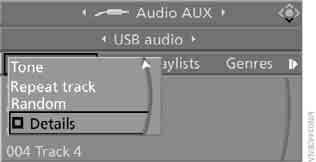
Information on the current file is displayed.
Test yourself
A quick BMW X3 quiz: every answer comes with an explanation and a link to the manual page.
Was this page helpful?