Auxiliary heating/ventilation system
Both systems are controlled via iDrive or with the remote control.
You can program two switch-on times for the system.
The auxiliary ventilation system ventilates the interior and lowers the air temperature inside.
The auxiliary heating system heats the interior and allows the vehicle body to be cleared of snow and ice more quickly.
The systems remain on for 30 minutes. They can also be switched on and off directly, without programming a time. Due to high current consumption, it is not recommended to switch the system on twice in succession. The battery must first be recharged while driving.
Auxiliary Ventilation
The system operates when the outside temperature is above 15 °C if a switch-on time has been programmed, and at any temperature if switched on directly, but not while driving.
If the auxiliary heater is not fitted, the auxiliary ventilation switches on at any temperature provided a switch-on time has been programmed.
Air is supplied from the chest-level outlets in the control panel. Keep these outlets open.
Auxiliary Heating
The system operates when the outside temperature is below 15 °C if a switch-on time has been programmed, and at any temperature if switched on directly.
Heated air is automatically supplied to the windshield, side windows and footwell.
With the ignition key in position 1, you can adjust the interior temperature, air volume and air distribution. After switching off, the system continues to operate for some time. However, its LED goes out.
Do not operate the independent heater in enclosed spaces:
Inhaling exhaust gases, which are harmful to health, can lead to loss of consciousness and even death. Exhaust gases contain carbon monoxide, a poisonous gas that has no color or odor. Switch off the auxiliary heating while refueling.◄
 The independent heater does not operate if the fuel in the tank is less than the amount required for 50 km of driving range.◄
Direct Operation On and Off
iDrive operating principles
1. Open the basic menu.
2. To access the „Climate“ menu, slide the controller to the left.
3. Select „Independent mode“ and press the controller.
4. Select „Direct operation“ and press the controller.
5. Select „Independent heater“ or „Independent ventilation“ and press the controller.

 The independent ventilation or heating system is switched on. LED
 flashes.
Programming the Switch-On Time
iDrive operating principles
1. Open the basic menu.
2. To access the „Climate“ menu, slide the controller to the left.
3. Select „Independent mode“ and press the controller.
4. Select „Switch-on times“ and press the controller.
Timer settings must differ from each other by at least 31 minutes.◄
5. Slide the controller to the left or right and select „Timer 1“ or „Timer 2“.
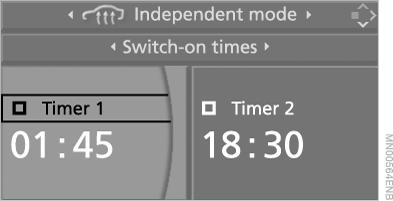
6. Move to the hours input position and press the controller. The hours display is highlighted.
7. Turn the controller to set the hours.
8. Press the controller. The minutes display is highlighted.
9. Turn the controller to set the minutes.
Activating the Timer
Slide the controller to the left or right to select „Timer 1“ or „Timer 2“, then press the controller.

 The timer is activated. The LED lights up.
 .
 The corresponding system will switch on at the set time within the next 24 hours. To switch on the system again, confirm the time again.◄
Test yourself
A quick BMW X5 quiz: every answer comes with an explanation and a link to the manual page.