Automatic climate control with extended functions
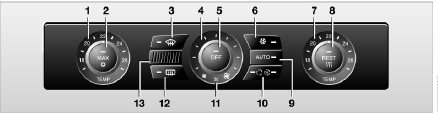
1 Temperature, driver's side
2 Maximum cooling
3 Defrosting and defogging of windows
4 Manual adjustment of air volume
5 Switching off automatic climate control
6 Switching air conditioning on and off manually
7 Temperature, front passenger side
8 Residual heat function
9 Automatic program
10 Automatic Air Quality Control (AUC)/recirculation mode
11 LED of auxiliary heating/ventilation system
12 Rear window defroster
13 Air intake grille for interior temperature sensor – do not cover
The current airflow distribution setting can be viewed on the control display.
Comfort Climate
The automatic program (AUTO) optimally regulates air distribution and air volume under almost all conditions. You only need to set the desired temperature.
A detailed description of the available settings follows below.
Automatic program
 The automatic program (AUTO) adjusts the air distribution and air volume to the windshield, side windows, upper body and footwell for you, and adjusts the set temperature to suit the season.
The air conditioning is switched on automatically together with the AUTO program. A special condensation sensor ensures that no moisture condenses on the windows.
Temperature Adjustment
 Turn this knob to adjust the air temperature on the driver's side and on the front passenger's side.
After the vehicle starts moving, the system works to bring the temperature to the set value as quickly as possible and then maintains it at a constant level.
Defrosting and Defogging Windows
 This program provides rapid defrosting and defogging of the windshield and front side windows.
Manual fan speed control
 Turn this knob to adjust the air volume. To switch automatic control back on, press the AUTO button.
Manually switching the air conditioning on and off
 When the air conditioning is switched on, the air is cooled, dehumidified and, depending on the set temperature, reheated. Under certain weather conditions, the windshield may fog up for a short time after the engine is started.
The air conditioning operates only when the engine is running. It switches on automatically when the AUTO program is selected.
Maximum cooling
 This program is designed for rapid cooling of the interior.
The system switches to recirculation mode. Air is delivered at maximum force only from the chest-level air outlets. Therefore, do not block them when this program is selected.
Automatic Air Quality Control (AUC)/Recirculation Mode
 If there is an unpleasant odor from outside or exhaust fumes, the supply of outside air to the interior can be shut off. In this case, the air inside circulates in a closed loop. When the AUC system is operating, the sensor detects exhaust fumes and automatically shuts off the supply of outside air.
Press the button repeatedly to cycle through three modes:
► LEDs off – outside air is supplied.
► Right LED on – AUC mode:
the system detects harmful substances and shuts off the supply of outside air to the interior if necessary.
► Left LED on – recirculation mode: supply of outside air is completely stopped.
If the windows fog up in recirculation mode, switch this mode off and increase the airflow if necessary.
Do not leave recirculation mode on for a long time, otherwise the cabin air quality will deteriorate.◄
Residual heat utilization mode
 With the engine switched off and warm, press this button.
Heat stored in the engine is used to heat the interior, for example while stopped at a railroad crossing.
The climate control settings can be changed with the ignition key in position 1 or higher.
You can use this function for 15 minutes after the ignition is switched off, while the engine is still warm and the battery has sufficient charge.
If these conditions are met, the LED in the button lights up.
Switching off automatic climate control
 Pressing this button switches off the air supply, heating and air conditioning.
To switch the system on, press any button on the control panel except the “REST” button.
Settings using iDrive
With the ignition key in position 2, the climate control settings can be changed using iDrive.
iDrive operating principles
1. Press the button .
The main menu opens.

2. To switch to the “Climate” menu, move the controller to the left.
You can adjust the following:
► manual air distribution (separately for driver and front passenger sides);
► adjustment of the temperature of air supplied to the chest-level outlets;
► intensity of the AUTO program.
These settings are saved for the key currently in use.
Manual adjustment of air distribution
You can adjust the air distribution yourself and set the temperature of the air supplied from the chest-level outlets.
1. Select “Air distribution” and press the controller.
2. Move the controller to the desired field and turn it to set the air distribution as you wish.
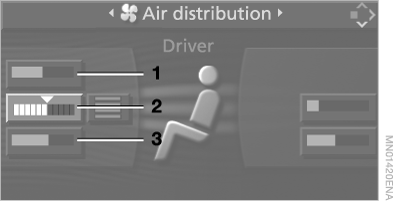
1 Air supply to windshield and side windows, driver's side only
2 Air supply to upper body
3 Air supply to footwell
To select the front passenger side:
move the controller to the right.
 Pressing the AUTO button activates the automatic air distribution program.◄
Adjusting the temperature of the air supplied to the chest area
1. Select “Air distribution” and press the controller.
2. Move the controller to the desired field and turn it to set the temperature as you wish.

Adjusting the intensity of the AUTO program
The intensity of the automatic climate control can be adjusted as desired.
1. Select “Automatic programs” and press the controller.
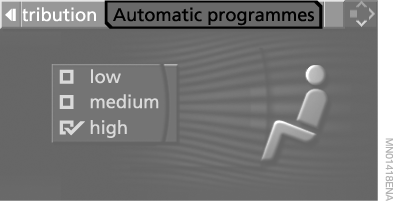
2. Select the intensity level and press the controller: High, Medium or Low.
Ventilation in the front of the interior
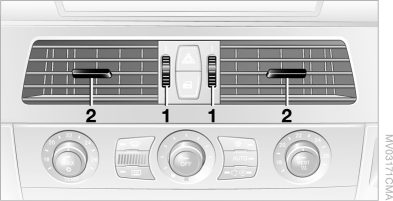
1 Wheels for smooth opening and closing of the air vents
2 Levers for changing the airflow direction
Make sure that no foreign objects get into the ventilation openings. If forced out by the air flow, they can cause injury.◄
Cold Air Flow
If the cabin is hot, direct the cold air toward yourself.
Draft-Free Ventilation
Adjust the air vents so the air does not blow directly at you, but to the side.
Rear Ventilation

1 Wheel for smooth opening and closing of air vents
2 Temperature adjustment wheel:
► turn toward the blue sector – cooler
► turn toward the red sector – warmer
3 Levers for changing the direction of airflow
Micro Filter / Activated Charcoal Filter
The micro filter cleans the incoming outside air of dust and pollen.
The activated charcoal filter additionally retains harmful gases. This combination filter is replaced as part of scheduled maintenance at a BMW service center.
Detailed information on maintenance work can be displayed on the control display.
Test yourself
A quick BMW X5 quiz: every answer comes with an explanation and a link to the manual page.