Route selection
You can specify the calculated route more precisely by setting certain criteria. They can be changed as often as required when entering a destination and during route guidance.
The system plans the route according to fixed rules. The road type, for example motorway or winding road, is taken into account. Road type data is stored on the navigation DVD. Therefore, there may be discrepancies between the suggested route and your own experience.
Changing route criteria
1. Select "Navigation" and press the controller.
2. Move the controller back so that the selection marker moves to the second field from the top. Turn the controller and select "Route criteria", then press the controller.

A list of criteria appears on the control display.
3. Select the route criterion:
► In the "Professional" navigation system:
"Using motorway" – preference is given to main roads and major highways;
► "Exclude motorways" – the system will avoid motorways where possible;
► "Fastest route" – shortest travel time, based on a combination of factors such as minimum distance and selection of high-speed sections;
► "Shortest route" – minimum distance without regard to travel time.
4. Press the controller.
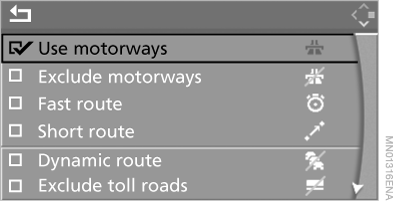
 marks the selected route criterion.
5. If desired, select additional route criteria and press the controller:
► "Dynamic route" – avoids traffic jams. Depending on the road type and the nature and length of the traffic jam, the route may also be calculated to pass through sections with slow-moving traffic.
► “Exclude toll roads” – the system avoids toll roads where possible.
► “Exclude ferries” – the system avoids ferry crossings where possible.
To exit the menu, select and press the controller.
Route criteria can also be changed when the arrow display or map is shown on the screen:
 select the corresponding symbol and press the controller.
Test yourself
A quick BMW X5 quiz: every answer comes with an explanation and a link to the manual page.