General information
The audio-navigation system, based on state-of-the-art technology, provides entertainment and information functions in the vehicle.
Using the PRESET [1~6] buttons, you can store up to 36 FM, AM and DAB (Digital Audio Broadcasting) radio stations in six sets, which makes radio use easier. DAB is available only on Type 1/2-A models.
The built-in CD player can play audio CDs and MP3 (WMA) discs, and the USB port allows playback of audio files from a connected USB memory device or iPod.
The Bluetooth phone connection function allows you to make calls through a wireless hands-free set and to play music from your phone. The Bluetooth phone connection function is available only on Type 1/2-A models.
The external audio input allows you to connect a portable music player to enjoy the high sound quality offered by the audio-navigation system.
The digital sound processor includes several preset equalizer settings that optimize the audio signal.
Carefully designed controls, an intelligent display and a multifunction knob make the system easy to operate and adjust.
- The "Overview" section contains a brief presentation of the audio-navigation system functions and a list of all controls.
- The "Operation" section explains how to use the basic controls of the audio-navigation system.
Display screen
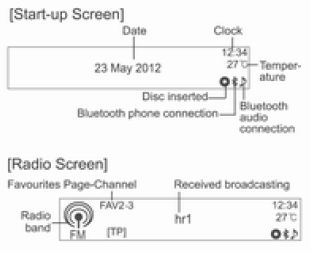
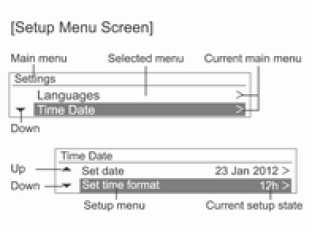
The display screen may differ from the one shown in this manual, as its appearance depends on the device settings and the vehicle equipment.
Anti-theft protection
The audio-navigation system has a built-in electronic anti-theft feature.
The audio-navigation system works only in the vehicle in which it was installed at the factory and cannot be used if stolen.
Test yourself
A quick Chevrolet Aveo quiz: every answer comes with an explanation and a link to the manual page.