Audio-navigation system
Overview of controls
In this manual: Audio-navigation system
33steps
~198min
4/5difficulty
Done 0 of 33
Type 1
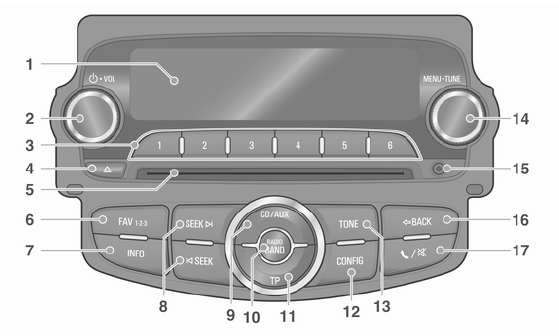
Type 1-A: Radio/DAB + CD/MP3 + AUX + USB/iPod + Bluetooth Type 1-B: Radio + CD/MP3 + AUX
- Display Shows playback/reception functions and menu and information items.
- POWER/VOLUME knob
- Press the button to turn the power on/off.
- Turn the knob to adjust the overall volume.
- PRESET [1 ~ 6] buttons
- Press and hold one of these buttons to add the current radio station to the current favorites set.
- Press one of these buttons to select the station assigned to it.
- EJECT button. Press this button to eject the disc.
- Disc slot. This is the slot for inserting and removing compact discs.
- FAVOURITE button [FAV1-2-3]. Press this button to select a set of saved favourite radio stations.
- INFORMATION button [INFO]
- Press this button to display file information in CD/MP3/USB/iPod mode.
- Displays radio station information and the currently playing track in radio mode.
- Buttons
 SEEK

- Press one of these buttons in radio or DAB mode to automatically search for stations with good reception. Press and hold one of these buttons to manually tune the radio frequency.
- Press one of these buttons in CD/MP3/USB/iPod mode to skip to the previous or next track.
Press and hold one of these buttons to fast-reverse or fast-forward the current track.
- CD/AUX button. Press this button to select CD/MP3/AUX or USB/iPod/Bluetooth Audio.
- RADIO BAND button. Press this button to turn on FM/AM or DAB radio reception.
- TP button. Turns the TP (Traffic Programme) function on or off when using FM RDS.
- CONFIG button. Press this button to display the Settings menu.
- TONE button. Press this button to adjust the tone or select a sound setting mode.
- MENU/TUNE knob
- Press this button to display the currently active menu or to select an option or setting value.
- Turn the knob to scroll through or change an option or setting value.
- AUX jack. This jack is used to connect external audio sources.
- P BACK button
- Deletes entered text or returns to the previous menu.
- PHONE/MUTE button
- Press this button to activate Bluetooth phone mode (Type 1-A models only), or to turn mute on or off (Type 1-B models only).
- Press and hold this button to turn mute on or off (Type 1-A models only).
Type 2

Type 2-A: Radio + CD/MP3 + AUX + USB/iPod + Bluetooth. Type 2-B: Radio + CD/MP3 + AUX
- Display Shows playback/reception functions and menu and information items.
- POWER/VOLUME knob
- Press the button to turn the power on/off.
- Turn the knob to adjust the overall volume.
- PRESET [1 ~ 6] buttons
- Press and hold one of these buttons to add the current radio station to the current favorites set.
- Press one of these buttons to select the station assigned to it.
- EJECT button. Press this button to eject the disc.
- Disc slot. This is the slot for inserting and removing compact discs.
- FAVOURITE button [FAV1-2-3]. Press this button to select a set of saved favourite radio stations.
- INFORMATION button [INFO]
- Press this button to display file information in CD/MP3/USB/iPod mode.
- Displays radio station information and the currently playing track in radio mode.
- Buttons
 SEEK

- Press one of these buttons in radio mode to automatically search for stations with good reception. Press and hold one of these buttons to manually tune the radio frequency.
- Press one of these buttons in CD/MP3/USB/iPod mode to skip to the previous or next track.
Press and hold one of these buttons to fast-reverse or fast-forward the current track.
- CD/AUX button. Press this button to select CD/MP3/AUX or USB/iPod/Bluetooth Audio.
- RADIO BAND button. Press this button to switch between FM or AM radio reception.
- TP button. Turns the TP (Traffic Programme) function on or off when using FM RDS.
- CONFIG button. Press this button to display the Settings menu.
- TONE button. Press this button to adjust the tone or select a sound setting mode.
- MENU/TUNE knob
- Press this button to display the currently active menu or to select an option or setting value.
- Turn the knob to scroll through or change an option or setting value.
- AUX jack. This jack is used to connect external audio sources.
- P BACK button
- Deletes an entered entry or returns to the previous menu.
- PHONE/MUTE button
- Press this button to activate Bluetooth phone mode (Type 2-A models only), or to turn mute on or off (Type 2-B models only).
- Press and hold this button to turn mute on or off (Type 2-A models only).
Steering Wheel Audio Controls
Steering Wheel Audio Controls, Type 1: Option
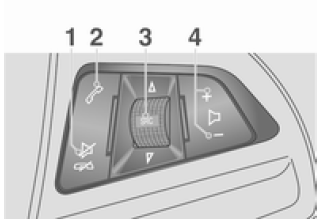
- Mute/End Call button. Press this button in any audio mode to turn mute on or off. In call mode, press this button to reject an incoming call or end a call.
- Talk button
- Press this button to answer a call or enter redial mode.
- Press and hold this button to display the call history, or to switch between handsfree mode and handset mode during a call.
- Source button/knob [
 SRC
 ]
- Press this button to select an audio mode.
- Turn the knob to change the stored radio station or the music being played.
- Volume buttons [+ -]
- Press the + button to increase the volume.
- Press the - button to decrease the volume.
Steering Wheel Audio Controls, Type 2: Option
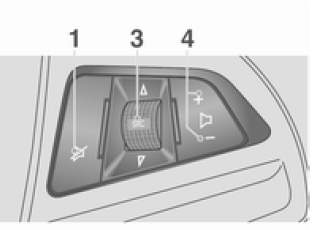
- Mute/End Call button. Press this button to turn mute on or off.
- Not available
- Source button/knob [
 SRC
 ]
- Press this button to select an audio mode.
- Turn the knob to change the stored radio station or the music being played.
- Volume buttons [+ -]
- Press the + button to increase the volume.
- Press the - button to decrease the volume.
Test yourself
A quick Chevrolet Aveo quiz: every answer comes with an explanation and a link to the manual page.
Was this page helpful?