Audio-navigation system
Making a Call by Entering a Number
In this manual: Audio-navigation system
4steps
~24min
2/5difficulty
Done 0 of 4
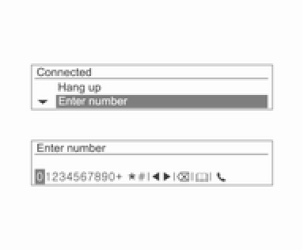
To make a call by entering a number, press the MENU-TUNE knob, turn the knob to select Enter Number, then press the MENU-TUNE knob.
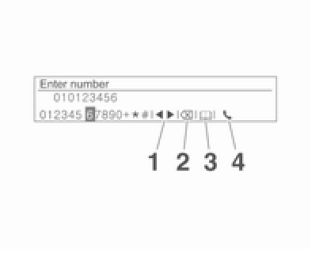
Turn the MENU-TUNE knob to select the desired character or digit, then press the MENU-TUNE knob to enter it.
- Repeat this procedure until all digits are entered.
- Press the

BACK button to delete characters one at a time, or press and hold this button to delete all entered characters. - The following describes how to edit the entered information.
- Move: Moving the input position
- Delete: Deleting an entered character
- Phonebook: Searching for contacts (available after phone numbers are updated)
- Dial: Starting to dial the number
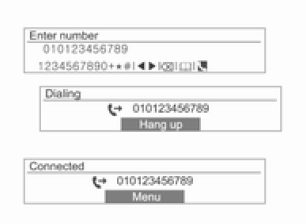
After entering the whole phone number, turn the MENU-TUNE knob to start dialing [ ], then press the
knob to make the call.
To end the call, turn the MENU-TUNE knob to select the option to end the call, then press the MENU-TUNE knob.
Test yourself
A quick Chevrolet Aveo quiz: every answer comes with an explanation and a link to the manual page.
Was this page helpful?