Steering Wheel Adjustment, Steering Wheel Controls
Steering Wheel Adjustment
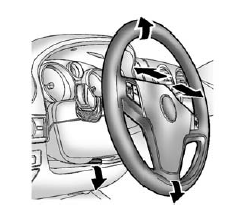
To adjust the steering wheel:
- Hold the steering wheel and pull the lever down.
- Move the steering wheel up or down.
- Pull or push the steering wheel closer or away from you.
- Pull the lever up to lock the steering wheel in place.
Do not adjust the steering wheel while driving.
Steering Wheel Controls

For vehicles with audio steering wheel controls, some audio controls can be adjusted at the steering wheel.
+ / − (Next/Previous): Press and release to go to the next or the previous preset radio station or CD track.
 (Call/Mute): For vehicles with Bluetooth® and OnStar®, press and hold to interact with those systems.
See Bluetooth on page 7-24 or "OnStar," if equipped. Press and release to mute the system. Press it again to turn the sound back on.
 (End Call): Press to reject an incoming call, or end a current call.
 (Volume): Move the thumbwheel up or down to increase or to decrease the volume.
Horn
Press  on the steering wheel pad to sound the horn.
Steering wheel in the Chevrolet Captiva is designed with both ergonomic comfort and driver convenience in mind. The adjustable features ensure a personalized driving experience, while the integrated controls make it easier for drivers to access essential functions without compromising safety. This combination of features contributes to a more enjoyable and confident driving experience for Captiva owners.
Test yourself
A quick Chevrolet Captiva quiz: every answer comes with an explanation and a link to the manual page.