Instruments and Controls
Driver Information Center
In this manual: Instruments and Controls
~1min read

The Driver Information Center (DIC) display is located in the instrument panel and may be of the mid-level or top-level type.
Function Selection
Use the buttons on the turn signal lever to select menus and functions.
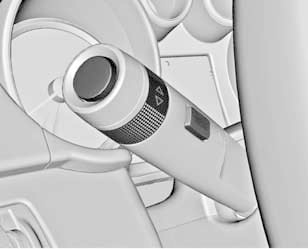
Use the MENU button to move between menus or to return from a submenu to the previous level. Menus are locked while the vehicle is moving and when the transmission selector is in a position other than P.
You can select one of the following menus:
• Vehicle Information menu
• Trip/Fuel menu
Turn the thumbwheel to highlight the desired menu item or to set a numeric value.
Press the SET/CLR button to select a function or to acknowledge a message.
Test yourself
A quick Chevrolet Cruze quiz: every answer comes with an explanation and a link to the manual page.
Was this page helpful?