Frequency Band Menus
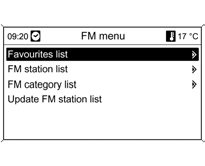
Alternative station selection methods are available in the special frequency band menus.
To open the menu of the corresponding frequency band, press the MENU knob while the main radio menu is active.
Favorites List
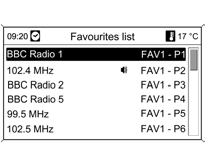
Select the Favorites List.
The favorites lists show all stored radio stations of the AM and FM frequency bands.
Select the desired station.
The currently selected station is marked with the symbol
Station Lists
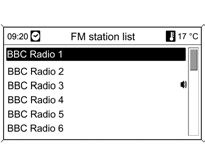
Select AM or the FM Station List.
All stations that can be received in the current reception area are displayed.
If a station list has not been created beforehand, the infotainment system performs an automatic station search.
Select the desired station.
The currently selected station is marked with the symbol
Updating the Station Lists
If stations stored in the station list of the corresponding band cannot be received:
Select the corresponding Update Station List command.
A station search will start. After the search is complete, the previously selected station will be played again.
To cancel the station search:
Press the MENU knob.
In the FM band, the corresponding category list is also updated.
Important Information on Updating the Station Lists
The dual tuner of the infotainment system constantly updates the station lists in the background. This ensures, among other things, that the station lists always contain stations that can be received in the area during a long drive.
Since the automatic update takes some time, not all available stations may appear in the list immediately when the reception area changes suddenly. In this case, the list can be updated more quickly by using the Update Station List command.
Category Lists

Many RDS stations broadcast a PTY code that indicates the type of program being transmitted (for example, news). Some stations also change the PTY code depending on the current content of the program.
The infotainment system stores these stations, sorted by program type, in the corresponding category list.
To find the type of program being broadcast by a station:
Select the FM Category List.
A list of the program types currently available is displayed.
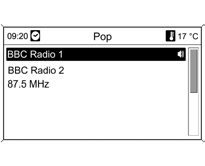
Select the desired program type.
A list of stations broadcasting a program of the selected type is displayed.
Select the desired station.
When the station list is updated, the category list is also updated.
The currently selected station is marked with the symbol .
Test yourself
A quick Chevrolet Cruze quiz: every answer comes with an explanation and a link to the manual page.