Automatic air conditioning
The air conditioning operates when the engine is running and in STOP mode of the Stop & Start system.
Automatic operating mode
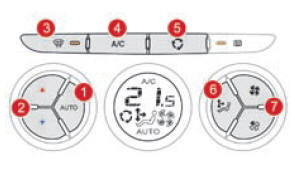
1. Automatic comfort program
 Press the "AUTO" button. The
"AUTO" symbol comes on.
This mode is recommended, as it automatically and optimally controls the following functions: cabin temperature, airflow rate, air distribution and fresh air intake, according to the selected comfort value.
The system is designed to operate in any season with the windows closed.
For your convenience, the previous settings are retained when the vehicle is restarted. When the engine is cold, to avoid blowing too much cold air, the airflow increases gradually.2. Temperature control
The value on the display corresponds to a set comfort level, not to a temperature in degrees Celsius or Fahrenheit.
 This value is adjusted by pressing buttons "5" and "6". A setting close to 21 provides optimum comfort. However, depending on your needs, you can set a value between 18 and 24.
3. Automatic visibility program
 To quickly demist or defrost the
windscreen and side windows (humidity, several passengers, frost...), the automatic "comfort" program may not be sufficient.
Select the "visibility" program. The indicator light of button 3 comes on.
The system automatically controls the air conditioning and airflow rate, and at the same time distributes air optimally towards the windscreen and side windows.
Recirculation mode 5 is switched off.
To switch off the program, press button 3 or "AUTO" again; the indicator light goes off and the "AUTO" symbol is displayed.
With the Stop & Start function, STOP mode is unavailable while demisting is switched on.Manual control of selected functions
You can, as preferred, set one or more functions manually while the others remain in automatic mode.
The "AUTO" symbol goes off.
Pressing the "AUTO" button returns the system to automatic operation.
Switching to manual mode may reduce comfort (temperature, humidity, odour, fogging). To cool or heat the cabin to the maximum, it is possible to exceed the minimum value of 14 or the maximum value of 28.- Press the blue button 2 until "LO" is displayed, or the red button 2 until "HI" is displayed.
4. Switching the air conditioning on/off
 Pressing this button
switches off the air conditioning.
Switching off may reduce comfort (humidity, fogging).
Pressing it again returns the air conditioning to automatic operation. The "A/C" symbol comes on.
5. Fresh air mode / Recirculation mode
 Pressing this button
switches on recirculation mode in the cabin. The recirculation symbol 5 comes on.
Recirculation mode isolates the cabin from outside odours and smoke.
Pressing this button again, or the "AUTO" button, returns automatic control to fresh air mode. The recirculation symbol 5 goes off.
Avoid prolonged use of recirculation mode (risk of the windows fogging and of reduced cabin air quality).6. Air distribution control
 Each press of this button
directs the airflow to:
- the windscreen and side windows (defrosting or demisting),
- the windscreen, side windows and vents,
- the windscreen, side windows, front vents and passengers' feet,
- the windscreen, side windows and passengers' feet,
- passengers' feet,
- vents and passengers' feet,
- vents.
7. Airflow rate control
 The airflow rate can be
increased or decreased by repeatedly pressing the "full fan" button.
The airflow rate symbol (fan) fills in as the value increases.
 Press the "empty
fan" button to decrease the airflow rate.
Switching off the system
 Keep pressing the "empty fan" airflow button 7 until the fan symbol disappears.
This operation switches off all air conditioning functions.
Thermal comfort control stops working. However, a slight airflow caused by the movement of the vehicle may still be felt.
Pressing the "full fan" airflow button 7 or "AUTO" again switches the system back on with the settings used before it was switched off.
Avoid driving for long periods with the air conditioning switched off (risk of fogging and reduced air quality).Test yourself
A quick Citroen DS3 quiz: every answer comes with an explanation and a link to the manual page.