Headlight Switch
The headlight switch is located on the left side of the instrument panel. This switch controls the operation of the headlights, parking lights, instrument panel lights, and fog lights (if equipped).
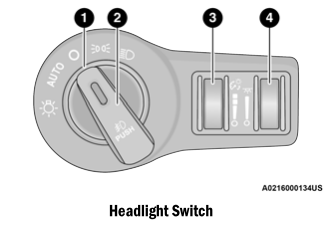
- Headlight Control Rotation
- Press the front fog lights
- Instrument Panel Dimmer Control
- Ambient Light Dimmer Control
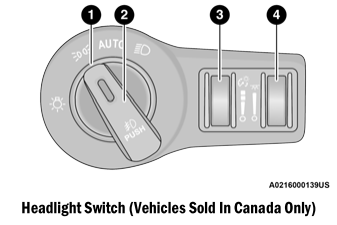
- Headlight Control Rotation
- Press the front fog lights
- Instrument Panel Dimmer Control
- Ambient Light Dimmer Control
NOTE:
Vehicles sold in Canada are equipped with a headlight switch without an OFF position. To turn off the exterior lights, the headlight switch must be turned to the AUTO position.
To turn on the headlights, rotate the headlight switch clockwise. When the headlight switch is on, the parking lights, taillights, license plate lights, and instrument panel lights also turn on. To turn off the headlights, rotate the headlight switch back to the O (off) position.
For vehicles sold in Canada, rotate the headlight switch clockwise from the parking light position to the AUTO position for automatic headlights. Rotate to the second detent to turn on the headlights, parking lights, and instrument panel lights.
NOTE:
- Your vehicle is equipped with plastic headlight and fog light (if equipped) lenses, which are lighter and less susceptible to damage from stones than glass lenses. Plastic is not as scratch-resistant as glass, so the cleaning procedures must be followed.
- To minimize the possibility of scratching the lenses and reducing light output, avoid wiping with a dry cloth. To remove road dirt, wash with a mild soap solution followed by rinsing.
Test yourself
A quick Dodge Charger quiz: every answer comes with an explanation and a link to the manual page.