Satellite Radio
HD Radio technology is a digital evolution of analog AM/FM radio. Your system has a special receiver that allows it to receive digital broadcasts where available, in addition to the analog broadcasts it already receives. Digital broadcasting provides better sound quality than analog broadcasting, with free, crystal-clear sound and without static or distortion. For more information and a guide to available stations and programming, visit www.hdradio.com.
When HD Radio is on and you tune to a station broadcasting HD Radio technology, you may see the HD Radio logo on the screen. When this logo is available, you may also see the Title and Artist fields on the screen.
The multicast indicator appears in FM mode only if the current station is broadcasting multiple digital streams. The numbers shown indicate the available digital channels, where new or different content is available. HD1 is the main program status and is available in both analog and digital broadcasts. Other multicast stations, HD2 through HD7, are available in digital only.
When HD Radio broadcasts are active, you can access the following features:
- Presets allow you to store the active channel as a memory preset. Touch and hold a memory preset slot until the sound returns. There is a brief mute while the radio stores the station. Sound returns when storing is complete. When switching to HD2 or HD3 memory presets, the sound mutes before digital audio plays, because the system must reacquire the digital signal.
HD Radio Reception and Station Troubleshooting
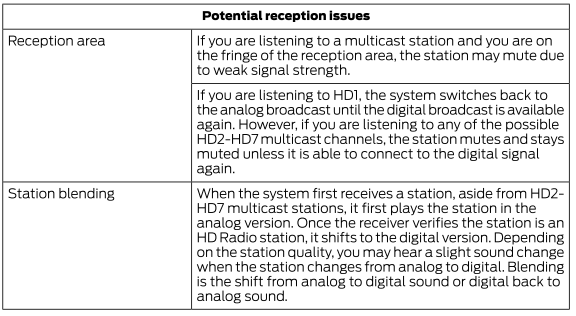
To provide the best experience, use the contact form to report any station problems you notice while listening to a station broadcasting with HD Radio technology. Independent parties own and operate each station. These stations are responsible for the accuracy of all audio streams and data fields.
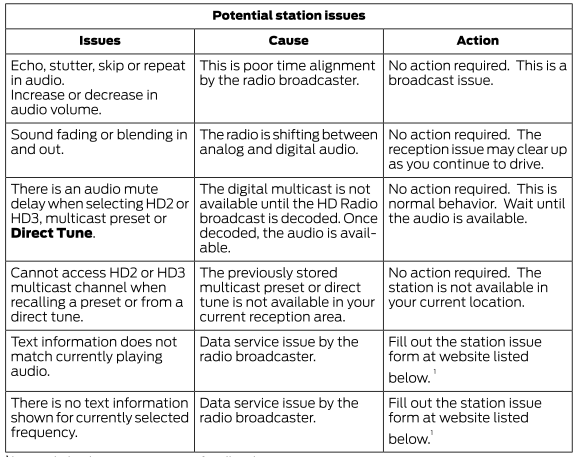
1 http://hdradio.com/stations/feedback
HD Radio technology is manufactured under license from iBiquity Digital Corporation and foreign patents. HD Radio and the HD and HD Radio logos are registered trademarks. DTS Ford Motor Company and DTS are not responsible for content sent using HD Radio technology. Content may be changed, added, or removed at any time at the discretion of the station owner.
SATELLITE RADIO (IF EQUIPPED)
SiriusXM® Satellite Radio broadcasts a variety of music, news, sports, weather, traffic, and entertainment satellite radio channels. For more information and a complete list of SiriusXM satellite radio channels, visit www.siriusxm.com in the United States, www.siriusxm.ca in Canada, or call SiriusXM at 1-888-539-7474.
Satellite Radio Reception Factors
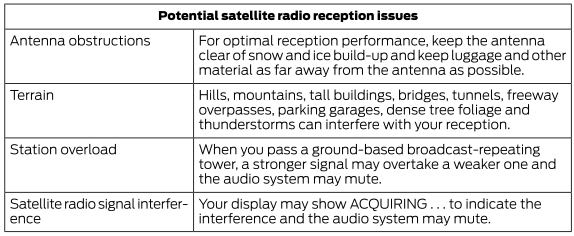
SiriusXM Satellite Radio Service

SiriusXM Satellite Radio is a subscription-based satellite radio service that broadcasts a variety of music, sports, news, weather, traffic, and entertainment programming. Your factory-installed SiriusXM Satellite Radio system includes hardware and a limited subscription period that begins on the date your vehicle is sold or leased. Check availability with an authorized dealer.
For more information on extended subscription terms (service fee required), the online media player, and a complete list of SiriusXM satellite radio channels and other features, visit www.siriusxm.com in the United States, www.siriusxm.ca in Canada, or call SiriusXM at 1-888-539-7474.
Satellite Radio Electronic Serial Number (ESN)
You need the ESN to activate, change, or track your satellite radio account.
How to Find Your ESN
When using satellite radio as the source, use the touchscreen to select the following:
Select Settings.
Select SiriusXM.
Select SiriusXM Information.
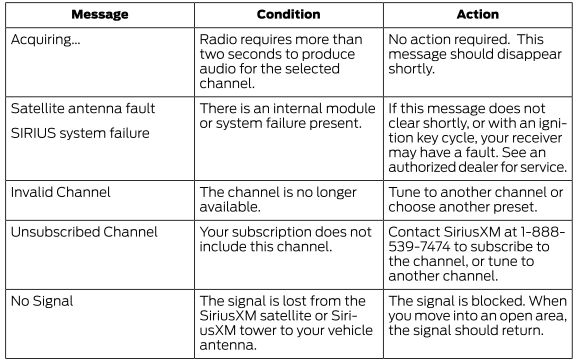
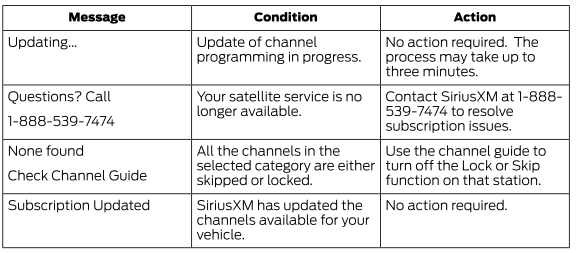
Troubleshooting
Test yourself
A quick Ford Explorer quiz: every answer comes with an explanation and a link to the manual page.