Infotainment Systems
SYNC Module [APIM]. Removal and Installation
In this manual: Infotainment Systems
4steps
~24min
2/5difficulty
Done 0 of 4
Removal
- Remove the FDIM.
Also refer to: Front Display Interface Module (FDIM) (415-00B Information and Entertainment System - General Information - Vehicles With: AM/FM/CD/SYNC/Touchscreen, Removal and Installation).
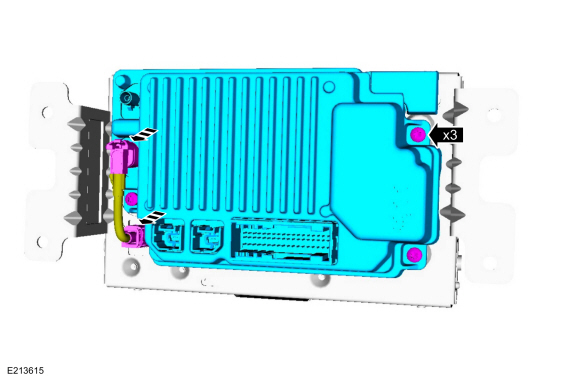
Remove the screws and separate the APIM from the FDIM.- Disconnect the electrical connector.
Installation
- To install, reverse the removal procedure.
- If installing a new APIM, program the APIM to the correct software level.
Refer to: SYNC Module [APIM] Programming (415-00B Information and Entertainment System - General Information - Vehicles With: AM/FM/CD/SYNC/Touchscreen, General Procedures).
Test yourself
A quick Ford Fiesta quiz: every answer comes with an explanation and a link to the manual page.
Was this page helpful?