Chassis
Steering Column. Removal and Installation
In this manual: Chassis
16steps
~96min
4/5difficulty
Done 0 of 16
Removal
NOTICE: To avoid damaging the clockspring, make sure the front wheels are in the straight-ahead position.
NOTICE: Precise manufacturing tolerances are required for the steering column. Never install a repaired, modified, non-original or reconditioned steering column. Always install a new steering column. Failure to follow this instruction may result in steering column failure.
- If an SRS fault is present, GO to step 2. Otherwise, turn the ignition off, wait at least one minute and GO to step 3.
- Disable the SRS.
Refer to: Disabling and Enabling the Supplemental Restraint System (SRS) (501-20B Supplemental Restraint System, General Procedures). - Remove the SCCM.
Refer to: Steering Column Control Module (SCCM) (211-05 Steering Wheel and Column Electrical Components, Removal and Installation). - Remove the steering column shrouds.
Refer to: Steering Column Shrouds (501-05 Interior Trim and Ornamentation, Removal and Installation). NOTICE: Make sure the steering wheel does not rotate, otherwise the clockspring may be damaged.
Secure the steering wheel.
- Release the retainers and position the instrument panel trim aside.

- Remove the bolts and the instrument panel finish panel.

- Disconnect the electrical connector.
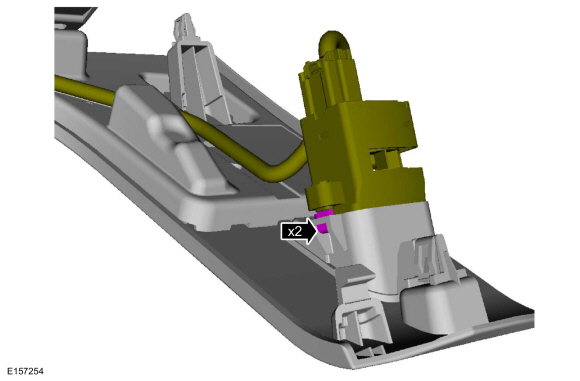
- Release the retainers and disconnect the steering column electrical connectors.
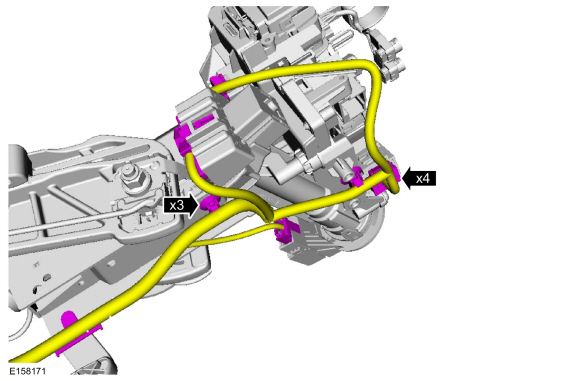
- Remove and discard the bolt.
Torque: 18 lb-ft (25 N·m)
- Position the upper shaft away from the lower shaft.

- Remove and discard the bolt.
- Press the retainers and disconnect the collapsible steering column module electrical connector.

- Remove and discard the bolts and remove the column.
Torque: 18 lb-ft (25 N·m)
Installation
- To install, reverse the removal procedure.
- If the SRS was de-powered.
Reset the SRS.
REFER TO: Supplemental Restraint System (SRS) Disabling and Enabling (501-20B Supplemental Restraint System, General Procedures).
If equipped with memory steering column, use the steering column control switch and set the tilt motor soft stops correctly.- Move the column upward until it reaches the end of its travel.
- Move the column in the same direction again until it reaches the end of travel.
- Move the column downward until it reaches the end of its travel.
- Move the column in the same direction again until it reaches the end of travel.
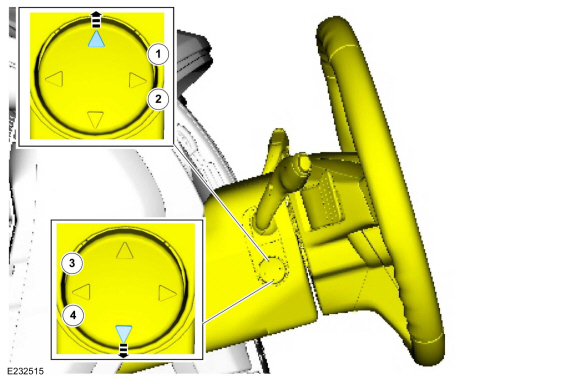
If equipped with memory steering column, use the steering column control switch and set the tilt motor soft stops correctly.- Move the column rearward until it reaches the end of travel.
- Move the column in the same direction again until it reaches the end of travel.
- Move the column forward until it reaches the end of travel.
- Move the column in the same direction again until it reaches the end of travel.
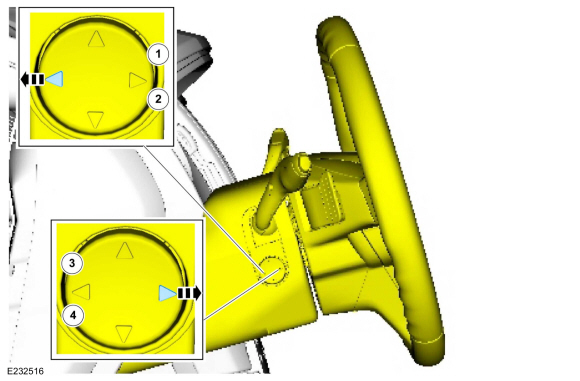
Test yourself
A quick Ford Fusion quiz: every answer comes with an explanation and a link to the manual page.
Was this page helpful?