Instrument cluster
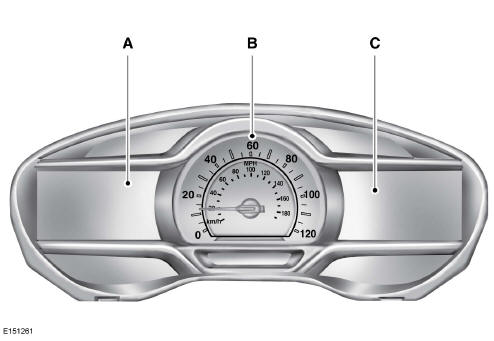
- Left information display
- Speedometer
- Right information display
Left information display
Odometer
Located at the bottom of the information display.
Records the total distance travelled by your vehicle.
High-voltage battery gauge:
The high-voltage battery gauge provides information on the state of charge, charge assistance and regenerative braking.
State of charge
The state of charge indicates the amount of energy stored in the high-voltage battery as a percentage of total energy capacity. The state of charge increases or decreases as the battery charges or discharges during normal operation.
Charge assistance
The up and down arrows show energy flowing into and out of the high-voltage battery. The upward arrow above the battery indicates that the battery is being recharged, for example through regenerative braking. The downward arrow below the battery indicates that the battery is discharging to provide energy for propulsion or to power the vehicle's accessories.
Regen active
A circular arrow symbol appears in the centre of the battery gauge when energy is being recovered through the regenerative braking system.
You can turn this function on or off from the settings menu of the information display.
Fuel gauge:
Note: The fuel gauge reading may vary slightly while the vehicle is moving or on a slope.
Switch the ignition on. The fuel gauge shows the approximate amount of fuel remaining in the tank. The arrow next to the fuel pump symbol indicates which side of the vehicle the fuel filler flap is on.
The needle should move towards F when you refuel. If the needle points towards E after filling the tank, your vehicle needs servicing soon.
Some needle movement is normal after refuelling:
- The needle may take some time to reach F after you leave the petrol station. This is normal and depends on the slope of the road at the petrol station.
- The amount of fuel delivered into the tank may be slightly less or slightly more than the amount shown on the gauge. This is normal and depends on the slope of the road at the petrol station.
- If the fuel nozzle cuts off before the tank is full, try a different nozzle.
Low fuel warning
A low fuel warning is displayed when the fuel gauge needle reaches 1/16th above empty.
Variations:
| Driving type (fuel economy conditions) | Fuel gauge position | Range |
| Motorway driving | 1/16th | 35 to 80 miles (56 km to 129 km) |
| Driving in difficult conditions (towing, frequent stops) | 1/16th | 35 miles (56 km) |
Vehicle Settings and Personalization
Display/Trip Computer
Information
Settings
Brake Coach display:
The Brake Coach appears when the vehicle comes to a stop. It helps you brake in a way that maximises the amount of energy recovered by the regenerative braking system. The percentage shown indicates the efficiency of regenerative braking, with 100% representing the maximum amount of energy that can be recovered.
You can turn this function on or off from the settings menu of the information display.
Trip Summary:
The trip summary is displayed when you switch the ignition off. It retrieves all data for the last trip. A new trip starts each time you start your vehicle (when the Ready to Drive message is displayed). The efficiency leaves for the trip are displayed on the right information display.
- Distance - Displays the total distance travelled, the distance travelled using only battery energy (EV distance) and the regeneration distance. The regeneration distance is the estimated range obtained with the energy recovered during regenerative braking.
- Energy Used - Displays the average fuel economy and the total fuel consumption.
- Braking Score - The percentage shown indicates the efficiency of regenerative braking for the trip.
Right information display
Entertainment
Phone
Navigation or Compass
Fuel Economy
Vehicle Range
The vehicle range indicates the approximate distance your vehicle can travel with the energy currently available.
The range shown is the estimated range based on the fuel remaining in the tank.
Use of the air conditioning and changes in driving style may cause the displayed range to vary.
Trip efficiency leaves
The trip efficiency leaves are displayed when you switch the ignition off. The number of leaves corresponds to the average efficiency for the last trip. A new trip starts each time you start your vehicle (when the Ready to Drive message is displayed). The corresponding trip summary data is displayed on the left information display.
Test yourself
A quick Ford Mondeo quiz: every answer comes with an explanation and a link to the manual page.