Manual Mode
Electronic Range Select (ERS) Mode
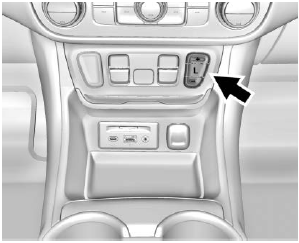
ERS or Manual Mode allows selection of the transmission gear range. Use this mode when driving downhill or towing a trailer to limit the highest gear and vehicle speed. The gear position indicator in the Driver Information Center (DIC) will display a number next to the letter L indicating the highest available gear in Manual Mode and driving conditions when Manual Mode was selected.
To use this feature:
- When the vehicle is in D (Drive), press the L (Low) button.
- Press the + (Plus) or - (Minus) button on the center stack to increase or decrease the available gear range.
When shifting to L (Low), the transmission will shift to a preset lower gear range. For this preset range, the highest available gear is displayed next to the letter L in the DIC. See Driver Information Center (DIC) (Base and Middle Level) or Driver Information Center (DIC) (Upper Level). All gears below this number are available for use. For example, when 4 is displayed next to L, 1st through 4th gears shift automatically. To shift to 5th gear, press the + (Plus) button or shift to D (Drive).
L (Low) will prevent shifting to a lower gear range if engine speed is too high. If the vehicle speed is not reduced within a set time, the downshift will not be completed. Slow the vehicle, then press the - (Minus) button to select the desired lower gear range.
Cruise control may be used when ERS is active.
Test yourself
A quick GMC Terrain quiz: every answer comes with an explanation and a link to the manual page.