Second generation (2007-2026)
Audio Screen Control
In this manual: Second generation (2007-2026)
~1min read
 AUDIO button (in USB mode)
Control the audio screen through the navigation system.
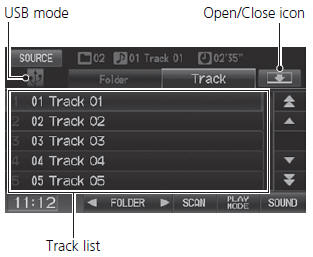
Select a track.
Select the Folder tab to display the folder list.
The following items are available:
• FOLDER: Select  or
 to select a folder.
• SCAN:
 Scan Track: Scans all tracks
in the current folder in the order they were stored and plays a 10-second sample. Select Stop to stop scanning and play the current selection.
 Scan Folder
: Scans the first
track in each folder on the USB flash drive and plays a 10-second sample. Select Stop to stop scanning and play the current selection.
 Random All: Plays all tracks on the
USB flash drive in random order.
 Random in Folder: Plays all tracks
in the current folder in random order.
 Repeat 1 Track: Repeats the current
track.
 Repeat 1 Folder: Repeats all tracks
in the current folder.
Displays/hides the detail information.
To stop repeat- or random-play, select the current play mode button again.
Test yourself
A quick Honda Fit quiz: every answer comes with an explanation and a link to the manual page.
Was this page helpful?