Second generation (2007-2026)
Playing Tracks in Folders
In this manual: Second generation (2007-2026)
~1min read
 AUDIO button (in USB mode)
►Folder
Change the folder if the tracks are stored in a folder structure.
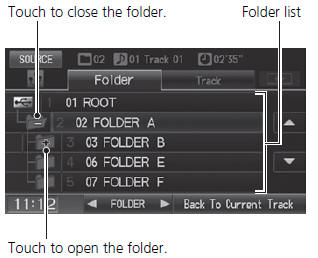
1. Select a folder. ► The system displays the track list. 2. Select a track.
► The system begins playing the selected track.
Folder List • Any music tracks not in a folder are automatically added to a “ROOT” folder, which is displayed at the top of the Folder List.• If the root folder has additional folders in a lower layer, they are listed on the screen.
Back to Current Track: Displays the current track at the top of the list.
Test yourself
A quick Honda Fit quiz: every answer comes with an explanation and a link to the manual page.
Was this page helpful?