Second generation (2007-2026)
Phone Setup
In this manual: Second generation (2007-2026)
~1min read
 PHONE button
► Phone Setup
Set HFL options and features.
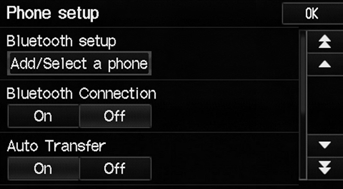
1. Select an item.
2. Select OK.
The following items are available:
• Bluetooth Setup: Pairs your phone to the system. • Bluetooth Connection: Turns the Bluetooth® connection on or off. On: Connects your Bluetooth-compatible device to the system. Off (factory default): Disables the feature. • Auto Transfer: Sets whether to automatically transfer a call from your phone to HFL when you enter and turn on the vehicle. On (factory default): Automatically transfers your call to HFL. Off: Disables the feature. • Auto Answer: Sets whether to automatically answer an incoming call. On: Automatically connects an incoming call after about five seconds. Off (factory default): Disables the feature. • Volume: Select  or
 to adjust the receiver and ring
volume. If you change the volume during a call, it is maintained at that level until you change it again.
You can control the HFL system using voice commands.
Test yourself
A quick Honda Fit quiz: every answer comes with an explanation and a link to the manual page.
Was this page helpful?