Second generation (2007-2026)
Pairing a Phone
In this manual: Second generation (2007-2026)
~1min read
 PHONE button
When no Bluetooth-compatible phone has ever been paired to the system, the following screen appears:
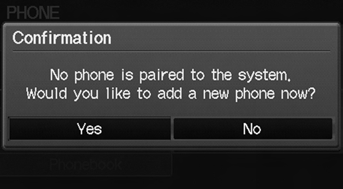
1. Select Yes. 2. Put your cell phone in “Discovery” or “Search” mode. 3. Select OK.
The system begins to search for your phone.
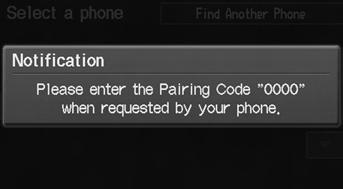
4. Select your phone in the list. ► Select Find Another Phone if your phone is not found. ► Refer to your phone manual for instructions on searching for a Bluetooth® device.
5. Enter the 4-digit pairing code on your phone when prompted to complete the pairing process.
Your Bluetooth-compatible phone must be paired to HFL before you can make and receive hands-free calls.
The maximum range between your phone and vehicle is about 30 feet (10 meters).
Phone Pairing Tips • You cannot pair your phone while the vehicle is moving. • Your phone must be in discovery or search mode when pairing the phone. Refer to your phone’s manual. • Up to six phones can be paired. • Your phone’s battery may drain faster when it is paired to HFL. • If your phone is not ready for pairing or not found by the system within three minutes, the system will time out and returns to idle.• The default pairing code “0000” is used unless you change the setting.
Pairing CodeYou can change the pairing code setting.
Delete a PhoneYou can delete the paired phone.
Test yourself
A quick Honda Fit quiz: every answer comes with an explanation and a link to the manual page.
Was this page helpful?