Receiving a Call
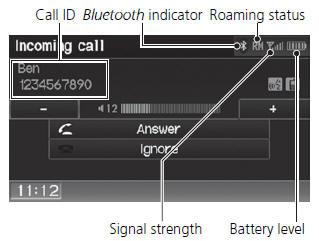
1. Press the  (Pick-Up) button
to answer a call and display the Calling screen.
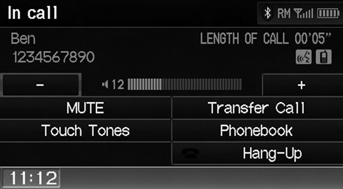
2. Press the  (Hang-Up) button
to terminate the call.
The following options are available during a call:
• MUTE: Allows you to mute your voice. • Touch Tones (available on some phones): Allows you to send numbers or names during a call. This is useful when you call an automated phone system. • Transfer Call: Allows you to transfer a call from HFL to your phone, or from your phone to HFL.
An incoming call notification appears on the navigation screen, and you hear an audible ring tone.
If your phone has Call Waiting, press the
button to put the original call on hold and answer the incoming call. To return to the original call, press the button
again. If you want to hang up the original call and answer the new call, press the button.
To change the volume level of HFL, use the audio system volume knob or the steering wheel volume controls.
Some phones may send battery, signal strength, and roaming status information to the screen.
PhonebookDisplays the cell phone’s imported phonebook.
Test yourself
A quick Honda Fit quiz: every answer comes with an explanation and a link to the manual page.