Second generation (2007-2026)
Setting Up Speed Dialing
In this manual: Second generation (2007-2026)
~1min read
 PHONE button
► Speed Dial 1 or Speed Dial 2
Create speed dial entries with voice tags for easy calling.
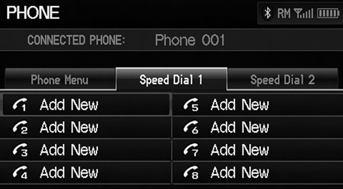
1. Select Add New.
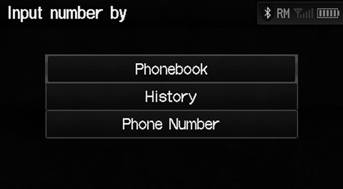
2. Select a number entry option.
3. Select a number.> 4. Select Voice Tag.> Select OK to store the speed dial without a voice tag.> 5. Follow the prompt to enter a voice tag.
The following options are available: • Phonebook: Adds a number from the imported phonebook. • History: Adds a number from the last 20 numbers. • Phone Number: Enters a number manually.
You can control the HFL system using voice commands.
Up to 15 speed dial entries can be stored per phone.
Test yourself
A quick Honda Fit quiz: every answer comes with an explanation and a link to the manual page.
Was this page helpful?