LCD Display Messages
Shift to P or N to start the engine (for Smart Key System and Intelligent Variable Transmission (IVT)/Dual Clutch Transmission)
This warning message appears if you attempt to start the engine with the shift lever not in P (Park) or N (Neutral).
Information
You can start the engine when the shift lever is in N (Neutral). However, for your safety, we recommend that you start the engine with the shift lever in P (Park).
Shift to P (for Smart Key System)
This message appears if you attempt to turn off the engine without the shift lever in P (Park).
At this time, the Engine Start/Stop button is turned to the ACC position (if you press the Engine Start/Stop button again, it will change to the ON position).
Press the START button again (for Smart Key System)
This message appears if you were unable to start the vehicle when the Engine Start/Stop button was pressed.
In this case, try to start the engine by pressing the Engine Start/Stop button again.
If the warning message appears each time you press the Engine Start/Stop button, have your vehicle inspected by an authorized Hyundai dealer.
Press the brake pedal to start the engine (for Smart Key System and Intelligent Variable Transmission (IVT)/Dual Clutch Transmission)
This warning message appears if the Engine Start/Stop button is changed to the ACC position by pressing the button twice without depressing the brake pedal.
To start the vehicle, depress the brake pedal and start the engine.
Depress the clutch pedal to start the engine (for Smart Key System and Manual Transmission)
This warning message appears if the Engine Start/Stop button is pressed several times to change it to the ACC position without depressing the clutch pedal.
Depress the clutch pedal to start the engine.
Press the START button with the key (for Smart Key System)
This warning message appears if you press the Engine Start/Stop button while the "Key Not Detected" warning message is displayed.
At this time, the immobilizer indicator blinks.
Low Battery (for Smart Key System)
This warning message appears if the Smart Key battery is discharged when the Engine Start/Stop button is in the OFF position.
Key Not Detected (for Smart Key System)
This warning message appears if the Smart Key is not detected when the Engine Start/Stop button is pressed.
Key Not In Vehicle (for Smart Key System)
This warning message appears if the Smart Key is not inside the vehicle when the Engine Start/Stop button is pressed.
Always keep the Smart Key with you when attempting to start the vehicle.
Door/Hood/Trunk Open Warning Light
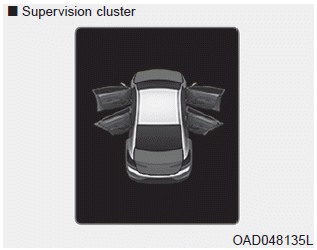
This warning indicates which door, hood or trunk is open.
If the Door/Hood/Trunk Open warning message is overridden by another warning message, the icon will appear at the top of the LCD display.
CAUTION
Before driving, make sure that the door, hood and trunk are fully closed.
Also, check that the Door/Hood/Trunk Open warning light is not illuminated or the message is not displayed on the instrument cluster.
Sunroof Open Warning Light
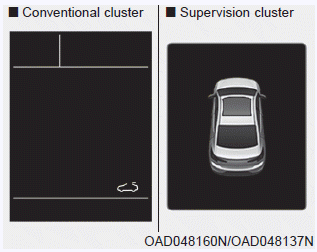
This warning message appears if you turn off the engine while the sunroof is open.
Light Mode
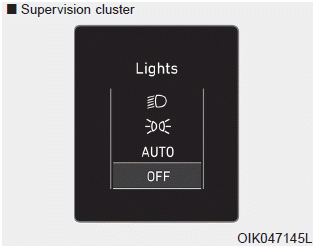
This indicator shows which exterior light is selected with the light control switch.
You can enable or disable the Wiper/Lights Display function in the User Settings mode on the instrument cluster LCD.
Wiper Arm
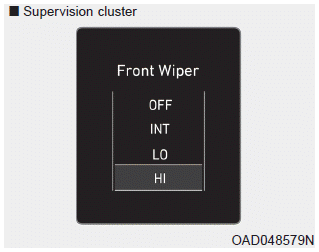
This indicator shows which wiper speed is selected with the wiper control switch.
You can enable or disable the Wiper/Lights Display function in the User Settings mode on the instrument cluster LCD.
Turn on the FUSE SWITCH.
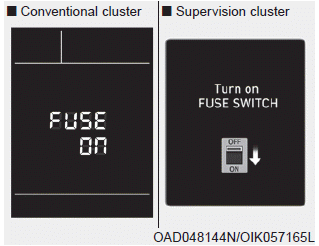
This warning message appears if the fuse switch under the steering wheel is turned off.
If this message is displayed, turn on the fuse switch.
For more information, refer to "Fuses" in Chapter 7.
Low Tire Pressure
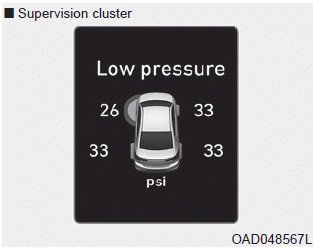
This warning message appears if tire pressure is low. The corresponding tire on the vehicle will be illuminated.
For more information, refer to "Tire Pressure Monitoring System (TPMS)" in Chapter 6.
Check the BRAKE SWITCH fuse.
This warning message appears if the brake switch fuse is blown.
If this message is displayed, replace the fuse with a new one before driving the vehicle. If this is not possible, you can start the engine by pressing and holding the Engine Start/Stop button for 10 seconds in the ACC position.
Low Fuel
This warning message appears if the fuel in the fuel tank is almost empty.
When this message is displayed, the driving range of the vehicle is approximately 30 miles.
When this message is displayed, the low fuel warning light in the instrument cluster will illuminate.
It is recommended to find the nearest gas station and refuel as soon as possible.
Engine Overheated
This warning message is displayed when the engine coolant temperature exceeds 248°F (120°C). This indicates that the engine is overheated and may be damaged.
If your vehicle overheats, refer to "Overheating" in chapter 6.
Check Headlamp
This warning message is displayed if the headlights are not operating properly. It may be necessary to replace the headlight bulb.
In addition, if a specific light (turn signal light, etc.) is not operating properly, a warning message is displayed according to the specific light (turn signal light, etc.). It may be necessary to replace the corresponding bulb.
NOTICE
When replacing a bulb, use a bulb of the same wattage.
For more details, refer to "BULB WATTAGE" in chapter 8.
Check the High Beam Assist (HBA) system (if equipped).
This warning message is displayed if there is a problem with the High Beam Assist (HBA) system. Have the vehicle checked by an authorized HYUNDAI dealer.
For more details, refer to "High Beam Assist (HBA)" in chapter 3.
Check the Forward Collision-Avoidance Assist (FCA) system (if equipped).
This warning message is displayed if there is a problem with the Forward Collision-Avoidance Assist (FCA) system. Have the vehicle checked by an authorized HYUNDAI dealer.
For more details, refer to "Forward Collision-Avoidance Assist (FCA) System" in chapter 5.
Check the Blind-Spot Collision Warning (BCW) system (if equipped).
This warning message is displayed if there is a problem with the Blind-Spot Collision Warning system. Have the vehicle checked by an authorized HYUNDAI dealer.
For more details, refer to "Blind-Spot Collision Warning or Rear Cross-Traffic Collision Warning (RCCW) System" in chapter 5.
Check the Smart Cruise Control system (if equipped).
This warning message is displayed if there is a problem with the Smart Cruise Control system. Have the vehicle checked by an authorized HYUNDAI dealer.
For more details, refer to "Smart Cruise Control" in chapter 5.
Check the Driver Attention Warning (DAW) system (if equipped).
This warning message is displayed if there is a problem with the Driver Attention Warning (DAW) system. Have the vehicle checked by an authorized HYUNDAI dealer.
For more details, refer to "Driver Attention Warning (DAW)" in chapter 5.
Check the Lane Keeping Assist (LKA) system (if equipped).
This warning message is displayed if there is a problem with the Lane Keeping Assist (LKA) system. Have the vehicle checked by an authorized HYUNDAI dealer.
For more details, refer to "Lane Keeping Assist (LKA)" in chapter 5.
Test yourself
A quick Hyundai Elantra AD quiz: every answer comes with an explanation and a link to the manual page.