Limitations of the Function
Navigation-based Smart Cruise Control may not operate normally under the following circumstances:
- Navigation does not operate properly
- Speed limit and road information in the navigation is not updated
- The map information and the actual road are different due to real-time GPS data errors or map information errors.
- Navigation searches for a route while driving
- GPS signals are blocked in areas such as tunnels.
- Navigation updates while driving
- Map information is not transmitted due to abnormal operation of the audio/video/navigation system
- Road that divides into two or more roads and rejoins
- Driver deviates from the route set in the navigation
- Destination route is changed or canceled by resetting the navigation
- The vehicle arrives at a service station or rest area.
- Speed limit changes on some sections depending on road conditions
- Android Auto or CarPlay is operating.
- Navigation cannot detect the current position of the vehicle (for example, elevated roads including overpasses, adjacent general roads, or nearby roads exist in a parallel path).
- Navigation updates while driving
- Navigation restarts while driving
- Bad weather such as heavy rain, heavy snow, etc.
- Driving on a road under construction
- Driving on a controlled road
- Driving on a road with a sharp curve
- Driving on roads with intersections, roundabouts, direct entrances and exits, etc.
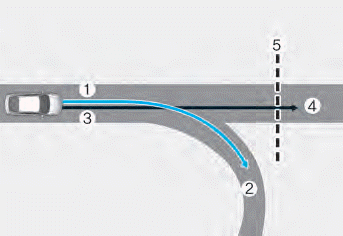
[1]: Set route, [2]: Branch, [3]: Driving route, [4]: Main road, [5]: Curved section of road
- When there is a difference between the navigation set route (branch) and the driving route (main road), the Highway Curve Zone Auto Deceleration function may not operate until the driving route is recognized as the main road.
- When the vehicle's driving route is recognized as the main road instead of the navigation set route's main road, the Highway Curve Zone Auto Deceleration function will operate. Depending on the distance to the curve and the current vehicle speed, vehicle deceleration may be insufficient or the vehicle may brake abruptly.
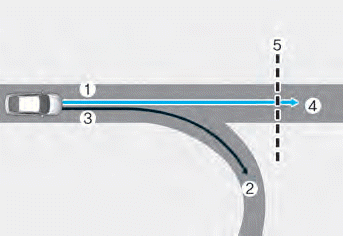
[1]: Set route, [2]: Branch, [3]: Driving route, [4]: Main road, [5]: Curved section of road
- When there is a difference between the navigation route (main road) and the driving route (branch road), the Curve Speed Reduction function will operate based on curve information on the main road.
- When it is determined that you have left the route after entering an interchange or intersection, the Curve Speed Reduction function will not operate.
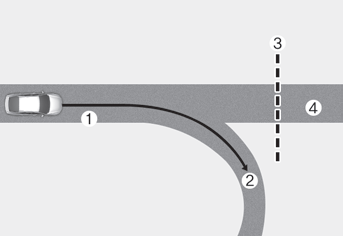
[1]: Driving Route, [2]: Branch Road, [3]: Curved Section of Road, [4]: Main Road
- If a destination is not set in navigation, the Curve Speed Reduction function will operate based on curve information on the main road.
- Even if you leave the main road, the Curve Speed Reduction function may operate temporarily based on navigation information of the curved section of the highway.
WARNING
- Navigation-based Smart Cruise Control does not replace safe driving practices but is a convenience feature. Always watch the road, and it is the driver's responsibility to avoid violating traffic laws.
- Speed limit information from navigation may differ from the actual speed limit on the road. It is the driver's responsibility to check the speed limit on the actual road or lane.
- Navigation-based Smart Cruise Control will be automatically canceled when exiting the highway (or expressway) main road. Always pay attention to the road and driving conditions while driving.
- Navigation-based Smart Cruise Control may not operate due to the presence of leading vehicles and traffic conditions. Always pay attention to the road and driving conditions while driving.
- When towing a trailer or another vehicle, it is recommended that Navigation-based Smart Cruise Control be turned off for safety reasons.
- After passing through a toll gate on a highway (or expressway), Navigation-based Smart Cruise Control will operate based on the first lane. If you enter one of the other lanes, the system may not operate correctly.
- The vehicle will accelerate if the driver presses the accelerator pedal while Navigation-based Smart Cruise Control is operating, and the system will not brake the vehicle.
- If the driver accelerates and releases the accelerator pedal while Navigation-based Smart Cruise Control is operating, the vehicle may not brake sufficiently or may suddenly decelerate to a safe speed.
- If the curve is too large or too small, Navigation-based Smart Cruise Control may not operate.
Information
- A time delay may occur between the navigation guidance and when Navigation-based Smart Cruise Control starts and ends operation.
- Speed information on the cluster and navigation may differ.
- Even if you are driving below the speed set by Smart Cruise Control, acceleration may be limited by curved sections ahead.
- If Navigation-based Smart Cruise Control operates when exiting the main road to an interchange, intersection, rest area, etc., the system may operate for a certain period of time.
- Navigation-based Smart Cruise Control deceleration may not feel sufficient due to road conditions such as uneven road surfaces, narrow lanes, etc.
Information
This device complies with Part 15 of the FCC Rules.
Operation is subject to the following two conditions:
1. This device may not cause harmful interference, and
2. This device must accept any interference received, including interference that may cause undesired operation.
3. Changes or modifications not expressly approved by the party responsible for compliance could void the user's authority to operate the equipment.
Information
Radio Frequency Radiation Exposure Information:
This equipment complies with FCC radiation exposure limits set forth for an uncontrolled environment.
This equipment must be installed and operated with a minimum distance of 8 inches (20 cm) between the radiator (antenna) and your body.
This transmitter must not be co-located or operated in conjunction with any other antenna or transmitter.
Test yourself
A quick Hyundai Elantra CN7 quiz: every answer comes with an explanation and a link to the manual page.