Hybrid System Overview
Scheduled Charging
In this manual: Hybrid System Overview
~1min read
- You can set a charging schedule for your vehicle using the AVN or the BlueLink application. For details, refer to the multimedia manual or the BlueLink manual for information on setting scheduled charging.
- Scheduled charging can only be performed when using a standard charging cable or a portable charging cable (ICCB: In-Cable Control Box).
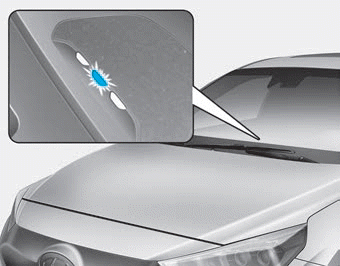
- When scheduled charging is set and a standard charging cable or portable charging cable (ICCB: In-Cable Control Box) is connected for charging, the indicator light blinks (for 3 minutes) to indicate that scheduled charging is set.
- If scheduled charging is set, charging does not start immediately after the standard charging cable or portable charging cable (ICCB: In-Cable Control Box) is connected. When immediate charging is required, use the AVN to deactivate the scheduled charging setting or press the scheduled charging deactivation (
 ) button.
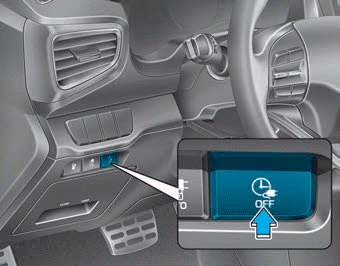
- If you press the scheduled charging deactivation (
 ) button to charge the battery immediately, charging will start 3 minutes after the charging cable is connected.
When you press the scheduled charging deactivation ( ) button for immediate charging, the scheduled charging setting is not fully deactivated. If you need to fully deactivate the scheduled charging setting, use the AVN to complete the deactivation.
Refer to "Normal Charging or Continuous Charging" for detailed information on the standard charging cable and portable charging cable (ICCB: In-Cable Control Box).
Test yourself
A quick Hyundai Ioniq quiz: every answer comes with an explanation and a link to the manual page.
Was this page helpful?