Body Electrical System
Speakers
In this manual: Body Electrical System
14steps
~84min
3/5difficulty
Done 0 of 14
Repair Procedures
Inspection
- Speaker Troubleshooting
- Basic Speaker Inspection: Check the sound from the speaker, making sure the speaker mounting screws are removed and the wiring connector is connected, to eliminate vibration transmitted from the body panels and surrounding parts.
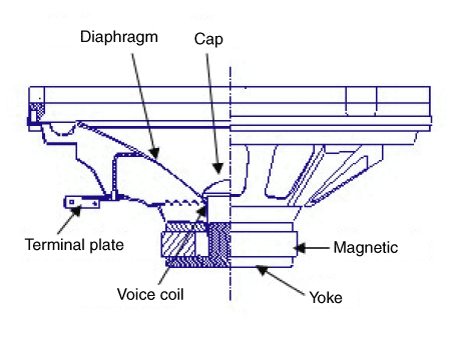
- Troubleshooting
No Symptom Inspection/Remedy 1 Rattling Noise - Before replacing the speaker, make sure the mounting screw is installed properly.
- After reinstalling the speaker, make sure that no rattling sound is heard.
- If the rattling sound is heard again, replace the speaker with a new one.
2 Noise - Check whether the wiring connector is connected properly. If not, connect the wiring connector.
- In the case of radio static, check for noise from the CD player.
- If noise is heard when the radio and CD are turned on, replace the speaker with a new one.

- If there is only static, it is caused by poor radio reception. Therefore, the speaker does not need repair or replacement.
3 Poor Performance Check the wiring connection between the battery and speaker - Before replacing the speaker, inspect the wiring and connections in the speaker circuit.
- Check the power supply to the speaker and the resistance, then check the sound quality.
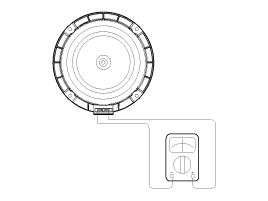
- If the speaker performs poorly, replace it with a new one.

- Speaker Handling Precautions
- Dropping or rough handling of the speaker may cause damage.
- Be careful not to get water and oil on the speaker.
- Be careful when handling the speaker, because the diaphragm material (paper) tears easily from impact and external force.
- If the audio system is modified at the customer's request, this may cause electrical damage to the speaker.
- In this case, the speakers are not covered by the manufacturer's warranty.
- Basic Speaker Inspection: Check the sound from the speaker, making sure the speaker mounting screws are removed and the wiring connector is connected, to eliminate vibration transmitted from the body panels and surrounding parts.
Removal
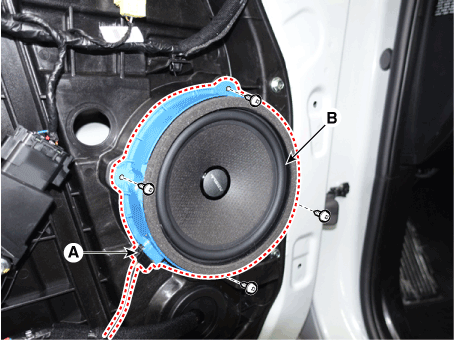
Front Door Speaker- Remove the front door trim panel. (Refer to Body - "Front Door Trim")
- Disconnect the speaker connector (A).
- Remove the front speaker (B) after loosening the screws.
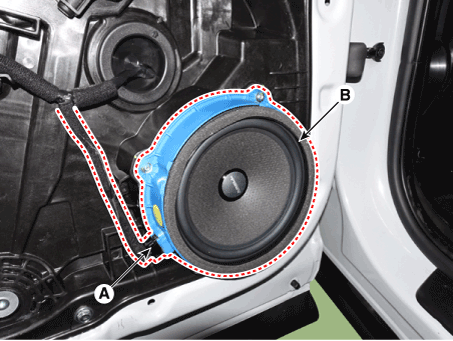
- Remove the rear door trim panel. (Refer to Body - "Rear Door Trim")
- Disconnect the speaker connector (A).
- Remove the rear speaker (B) after loosening the screws.
- Using a screwdriver or removal tool, remove the front door inside quadrant cover (A).
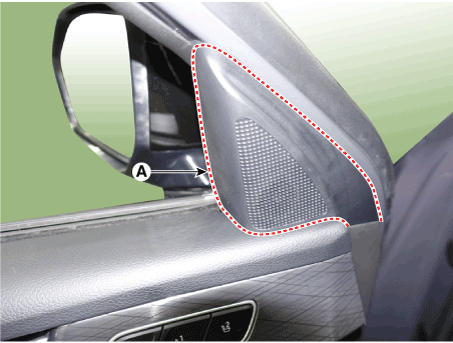
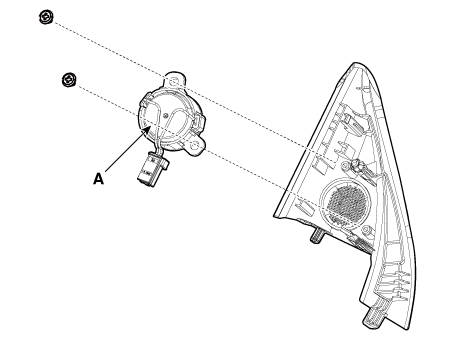
- Loosen the mounting screws, then remove the tweeter (A) by disconnecting the speaker connector.
Installation
Front Speaker- Install the front speaker.
- Install the front door trim panel.
- Install the rear speaker.
- Install the rear door trim panel.
- Connect the connector.
- Install the tweeter and the inner console cover.
Test yourself
A quick Hyundai Palisade quiz: every answer comes with an explanation and a link to the manual page.
Was this page helpful?