Smart Cruise Control Malfunction and Limitations
Smart Cruise Control Malfunction
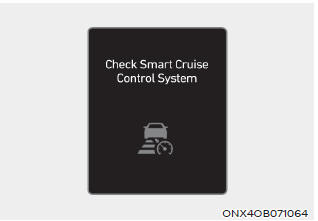
When Smart Cruise Control does not operate properly, the system warning message "Check Smart Cruise Control" appears and the warning light illuminates in the cluster. Have the vehicle inspected by an authorized HYUNDAI dealer.
Smart Cruise Control Deactivated
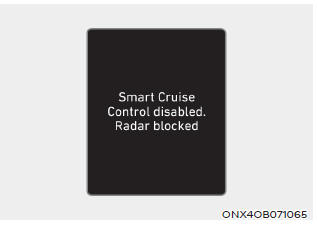
When the front radar cover or sensor is covered with snow, rain, or foreign material, it may reduce detection performance and temporarily limit or disable Smart Cruise Control.
In this case, the "Smart Cruise Control Limited. Radar Blocked" warning message appears on the cluster for a certain period of time.
Smart Cruise Control will operate normally once snow, rain, or foreign matter is removed.
WARNING
Even though the warning message does not appear on the cluster, Smart Cruise Control may not operate properly.
PLEDGE
Smart Cruise Control may not operate properly in certain areas (for example, open land) where there is nothing to detect after the engine is started.
Smart Cruise Control Limitations
Smart Cruise Control may not operate properly, or it may operate unexpectedly, under the following circumstances:
- The detection sensor or surrounding area is contaminated or damaged.
- Washer fluid is continuously sprayed or the wipers are operating.
- The camera lens is contaminated due to tinted, film-coated, or coated windshield, damaged glass, or sticky foreign material (sticker, insect, etc.) on the glass.
- Moisture is not removed or frozen from the windshield.
- The front view camera field of view is blocked by sun glare.
- Street lights or headlights of oncoming vehicles are reflected on a wet road surface, such as a puddle on the road.
- The temperature around the front view camera is high or low.
- An object is placed on the instrument panel.
- The surroundings are very bright.
- The surroundings are very dark, such as in a tunnel, etc.
- The brightness changes suddenly, for example when entering or exiting a tunnel.
- The outside brightness is low and the headlights are off or not bright.
- Driving in heavy rain or snow, or in dense fog.
- When driving through steam, smoke, or shadows.
- Only a part of the vehicle is detected
- The vehicle ahead has no taillights, or the taillights are located unusually, etc.
- The outside brightness is low and the taillights of the vehicle ahead are off or not bright.
- The rear of the vehicle ahead is small or does not appear normal (for example, tilted, overturned, etc.).
- The ground clearance of the vehicle ahead is low or high.
- A vehicle suddenly cuts in ahead
- Your vehicle is being towed.
- Driving through a tunnel or under an iron bridge.
- Driving near metal objects, such as a construction area, railway, etc.
- An object that reflects the front radar, for example, a guardrail or a nearby vehicle, etc.
- The bumper around the front radar is impacted or damaged, or the front radar is out of position.
- The temperature around the front radar is high or low.
- Driving in wide-open areas with few vehicles or structures (for example, desert, meadow, suburbs, etc.)
- The vehicle ahead is made of a material that does not reflect the front radar.
- Driving near an interchange or toll gate.
- Driving on a slippery surface due to snow, puddles, ice, etc.
- Driving on a curved road
- The vehicle ahead is detected late.
- The vehicle ahead is suddenly blocked by an obstacle.
- The vehicle ahead suddenly changes lanes or decelerates sharply.
- The vehicle ahead is curved due to its shape.
- The speed of the vehicle ahead is high or low.
- When a vehicle is ahead, your vehicle changes lanes at low speed.
- The vehicle ahead is covered with snow.
- Unstable driving
- You are at a roundabout and the vehicle ahead is not detected.
- You are continuously driving in a circle.
- Driving in a parking lot
- Driving through a construction site, unpaved road, partially paved road, uneven road, speed bumps, etc.
- Driving on a sloped road, curved road, etc.
- Driving along a roadside with trees or golden street lights.
- Excessive vehicle vibration during driving due to adverse road conditions
- The height of your vehicle is lowered or raised due to heavy loads, incorrect tire pressure, etc.
- Driving on a narrow road where trees or grass overgrow.
- Interference from electromagnetic waves, such as driving in an area with strong radio waves or electrical interference
• Driving on a curved road
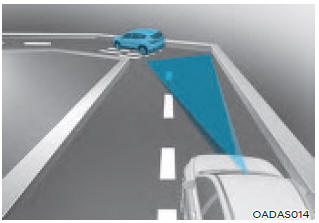
On curves, Smart Cruise Control may not detect a vehicle in the same lane and may accelerate to the set speed. In addition, your vehicle's speed may decrease rapidly when a vehicle ahead is suddenly detected.
Select an appropriate set speed on curves and depress the brake pedal or accelerator pedal according to the road and driving conditions ahead.
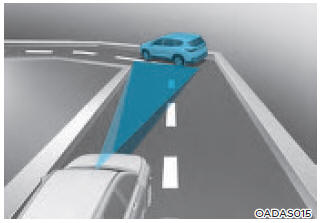
Your vehicle's speed may be reduced due to a vehicle in an adjacent lane.
Depress the accelerator pedal and select an appropriate set speed. Make sure that the road conditions allow safe operation of Smart Cruise Control.
• Driving on an inclined road
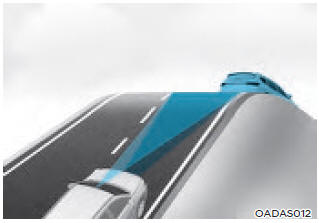
When driving uphill or downhill, Smart Cruise Control may fail to detect a vehicle moving in your lane and may cause your vehicle to accelerate to the set speed. In addition, the vehicle speed will decrease rapidly when a vehicle ahead is suddenly detected.
Select an appropriate set speed according to the road and driving conditions ahead, and press the brake pedal or accelerator pedal as necessary.
• Lane changes
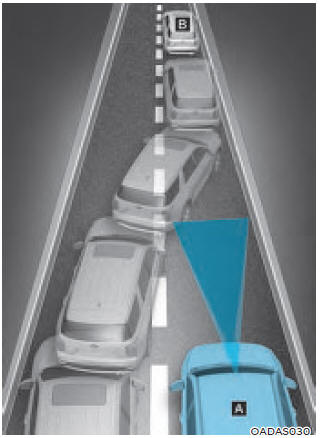
[A]: Your vehicle, [B]: Vehicle changing lanes
When a vehicle moves into your lane from an adjacent lane, it cannot be detected by the sensor until it enters the sensor detection range. Smart Cruise Control may not immediately detect a vehicle that changes lanes abruptly. In this case, maintain a safe braking distance and press the brake pedal as necessary to reduce speed and keep a safe distance.
• Detection situations are limited.
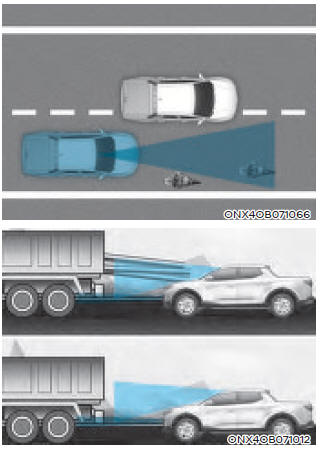
In the following cases, some vehicles in your lane may not be detected by the sensor:
- Vehicles offset to one side
- Slow-moving vehicles or vehicles decelerating sharply
- Vehicles with high ground clearance or vehicles with cargo protruding from the rear
- Vehicles with the front raised due to heavy loads
- Vehicles within approximately 6 ft (2 m) of your vehicle
- Oncoming vehicles
- Stopped vehicles
- Vehicles with a small rear profile, such as trailers
- Narrow vehicles, such as motorcycles or bicycles
- Special vehicles
- Animals and pedestrians
Adjust your vehicle's speed by depressing the brake pedal according to the road and traffic conditions ahead.
In the following cases, the vehicle ahead may not be detected by the sensor:
- When you are driving your vehicle
- Driving on narrow or sharply curved roads
Adjust your vehicle's speed by depressing the brake pedal according to the road and traffic conditions ahead.
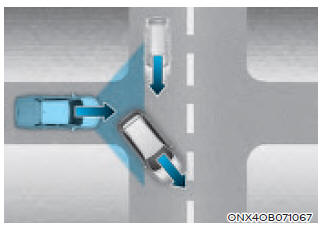
• When the vehicle ahead disappears at an intersection, your vehicle may accelerate.
Always pay attention to the road and driving conditions while driving.
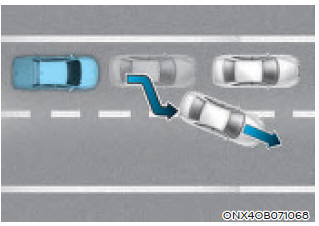
• When a vehicle in front of you merges out of the lane, Smart Cruise Control may not immediately detect a new vehicle now ahead of you.
Always pay attention to the road and driving conditions while driving.
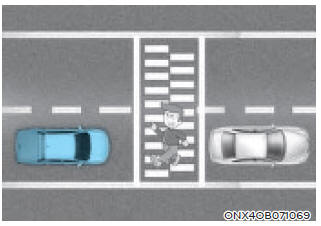
• Always watch for pedestrians when your vehicle is following a vehicle ahead.
Information
This device complies with Part 15 of the FCC Rules.
Operation is subject to the following two conditions:
1. This device may not cause harmful interference, and
2. This device must accept any interference received, including interference that may cause undesired operation.
3. Changes or modifications not expressly approved by the party responsible for compliance could void the user's authority to operate the equipment.
Information
Radio Frequency Radiation Exposure Information:
This equipment complies with FCC radiation exposure limits set forth for an uncontrolled environment.
This equipment must be installed and operated with a minimum distance of 8 inches (20 cm) between the radiator (antenna) and your body.
This transmitter must not be located near or operated in conjunction with any other antenna or transmitter.
Test yourself
A quick Hyundai Tucson quiz: every answer comes with an explanation and a link to the manual page.