Guide to the voice recognition screen
Voice recognition start screen

(1) Four most frequently used commands: The four most frequently used commands are displayed.
(2) Commands requiring additional settings: Commands that require additional settings before use are displayed.
(3) Voice status icon display.
 Voice recognition standby.
 Voice prompt in progress.
 Processing voice command.
(4) User voice volume: User voice volume is displayed in real time.
(5) Recognition results: Results for voice command input are displayed.
(6) Help: Available voice commands displayed in stages.
(7) Exit: End voice recognition.
Voice recognition Help screen

(1) List of voice commands
- Available voice commands are displayed.
- Select or state each command to bring up additional detailed commands.
(2) Voice recognition instructions by item: Voice recognition instructions are displayed by item.
(3) Voice recognition usage instructions: General instructions for use of voice recognition are displayed.
Voice recognition usage instructions screen
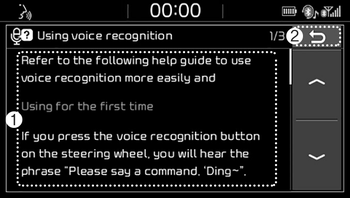
(1) Usage instructions display: Detailed instructions on voice instruction usage.
(2) Close: Close the voice recognition usage instructions screen and show the previous screen.
✽ NOTICE
- Voice recognition is disabled in the voice recognition usage instructions screen. Only manual controls are supported.
- The voice recognition usage instructions screen provides a large amount of information. For safety, the screen is disabled while driving.