Audio system
List of voice commands
In this manual: Audio system
~2min read
Voice command types
• Voice commands are categorized into ‘Global Commands’ and ‘Local Commands.’
1) Global Commands (●): Commands that can be used immediately after voice recognition is started.
2) Local Commands (O): Commands that can be used when radio, media or Bluetooth® phone functions are running or displayed on the screen after voice recognition is started.
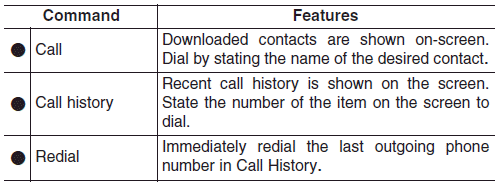
Phone commands
- Voice commands associated with phone functions can be used after a Bluetooth® device has been connected.
- To use voice commands using contact names, such as ‘Call John Smith,’ download contacts beforehand.
- After contacts are downloaded over Bluetooth®, some time may be required for conversion of contact info into voice data. During this conversion, phone calls cannot be made by saying contact names. The time required for contact info conversion depends on the number of entries in Contacts.
- When the ‘Call <Name>’ command is used, the name info saved in the downloaded contacts is used. If a friend with the name ‘John Smith’ is saved to Contacts under the nickname ‘Buddy,’ ‘Call John Smith’ is not recognized as a valid command. Instead, ‘Call Buddy’ is recognized.

✽ NOTICE
When dialing by name, if there are similar names or multiple subentries (mobile, work, home, other), you may be prompted to select the contact desired from a list.
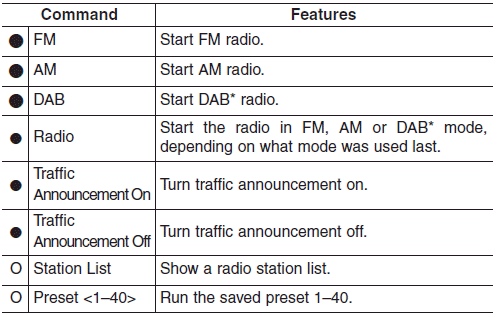
Radio voice commands
Media commands
If no media type is connected or there are no files available for playback, a voice prompt to that effect is played.
- If the name of the media currently playing is stated, the current status of operation is maintained.
E.g. Say ‘USB’ during USB playback. - External (AUX) devices do not support play, pause, shuffle and repeat voice commands.
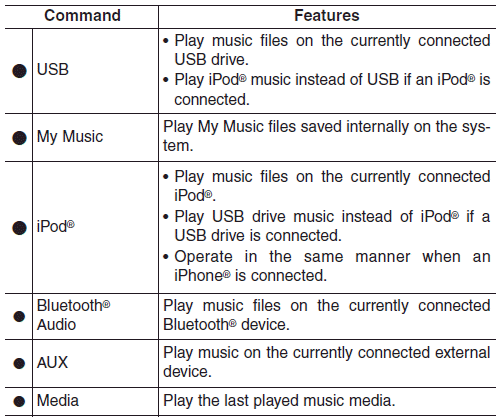
USB, iPod®, My Music commands
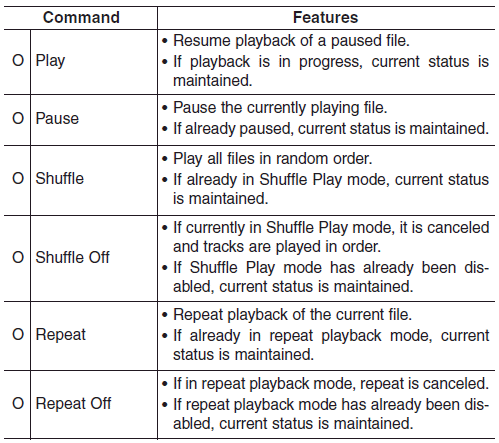
Bluetooth® Audio commands
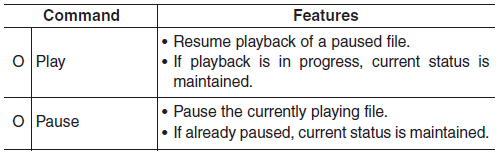
✽ NOTICE
Some Bluetooth® devices may not support the play/pause features.
Miscellaneous commands

Was this page helpful?