Pairing a Bluetooth® device
Information on pairing Bluetooth® devices
- Pairing refers to the process of pairing Bluetooth® cell phones or devices with the system prior to connection. This is a necessary procedure for Bluetooth® connection and usage.
- Up to five devices can be paired.
- Pairing Bluetooth® device is not allowed while vehicle is moving
Pairing the first Bluetooth® device
Select the [PHONE] button on the audio system or the [CALL] button on the steering wheel remote control ➟ Search for the vehicle from the Bluetooth® device, and pair ➟ Enter the passkey on the Bluetooth® device or approve passkey ➟ Bluetooth® pairing completed
1. When the [PHONE] button on the audio or the [CALL] button on the steering wheel remote control is pressed, the following screen is displayed. Devices can now be paired.
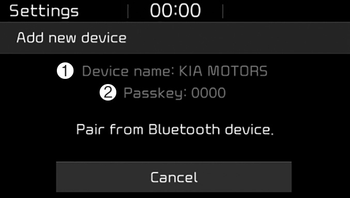
(1) Device name(Vehicle name): Searched name in Bluetooth® device.
(2) Passkey:Passkey for device pairing.
✽ NOTICE
The device name(vehicle name) in the image above is an example. Refer to your device for the actual name of your device.
2. Search for available Bluetooth® devices in the Bluetooth® menu of your Bluetooth® device (cell phone, etc.).
3. Confirm that the device name (vehicle name) in your Bluetooth® device matches the device name (vehicle name) shown on the audio screen, then select it.
4-1. For devices that require passkey entry, a passkey entry screen is shown on your Bluetooth® device.
- Enter the passkey ‘0000’, shown on the audio screen, in your Bluetooth® device.
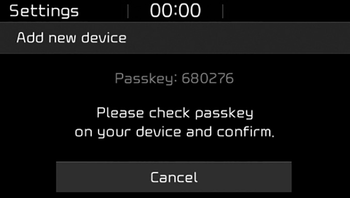
4-2. For devices that require passkey confirmation, the following screen is shown on the audio system. A 6-digit passkey input screen is shown in the Bluetooth® device.
- After confirming that the 6-digit passkey on the audio screen and the Bluetooth® device are identical, press [OK] in your Bluetooth® device.
✽ NOTICE
The 6-digit passkey in the image above is an example. Refer to your vehicle for the actual passkey
Pairing a second Bluetooth® device
Press the [SETUP] button on the audio system ➟ Select [Phone] ➟ Select [Connections] ➟ Select [Add new(Add New)].
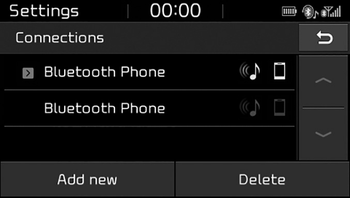
- The pairing procedure from this point is identical to [Pairing the first Bluetooth® device].
✽ NOTICE
- Bluetooth® standby mode lasts for three minutes. If a device is not paired within three minutes, pairing is canceled. Start over from the beginning.
- For most Bluetooth® devices, a connection is established automatically after pairing. Some devices, however, require separate confirmation when connecting after pairing. Be sure to check your Bluetooth® device after pairing to confirm that it has connected.