Features of your vehicle
User settings mode
In this manual: Features of your vehicle
9steps
~54min
2/5difficulty
Done 0 of 9
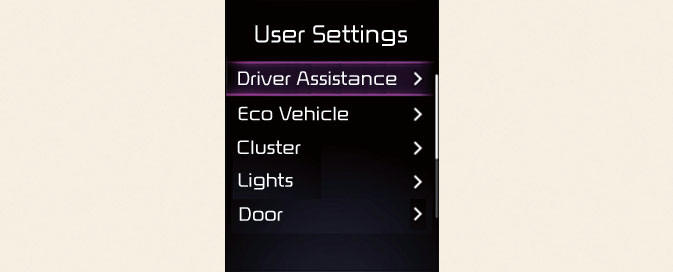
In this mode, you can change the settings of the instrument cluster, doors, lights, etc.
* The information provided may differ depending on which functions are applicable to your vehicle.
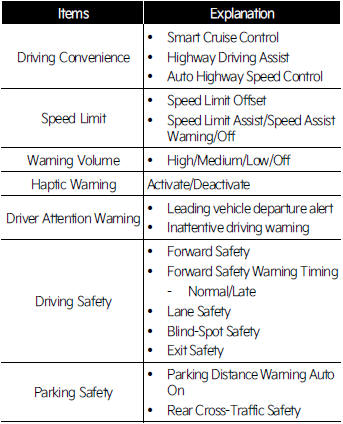
- Driver Assistance (if equipped)
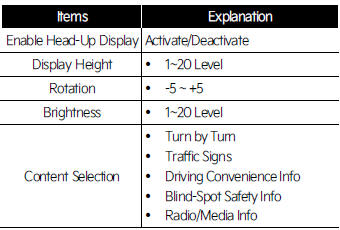
- Head-Up Display (if equipped)
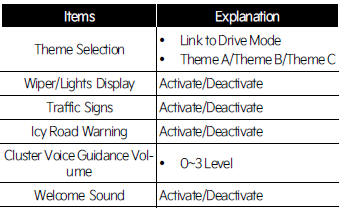
- Cluster (if equipped)
- Lights (if equipped)
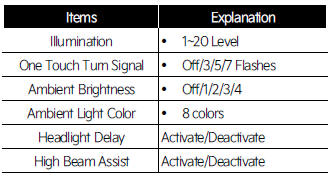
- Door (if equipped)
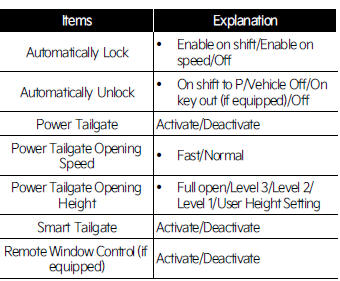
INFORMATION
Automatically Lock
- Enable On Shift: All doors will be automatically unlocked when the vehicle is shifted to P (Park) to R (Reverse), N (Neutral), or D (Drive).
(With the Engine ON, it is activated.)
- Enable On Speed: All doors will be automatically locked when the vehicle speed is over 15 km/h.
Automatically Unlock
- On Shift to P: All doors will be automatically unlocked if the gear is shifted to the P (Park) position.
(With the Engine ON, it is activated.)
- Vehicle Off/On key out (if equipped): All doors will be automatically unlocked when the ignition key is removed from the ignition switch or the ENGINE START/STOP button is set to the OFF position.
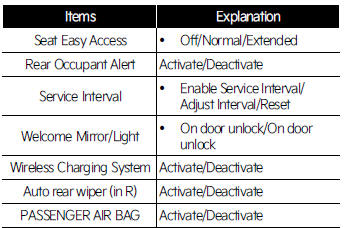
- Convenience (if equipped)
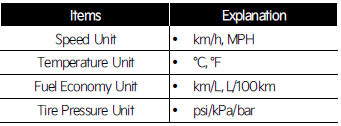
- Units
- Language

- Reset

Was this page helpful?