Body Electrical System
Repair Procedures
In this manual: Body Electrical System
16steps
~96min
4/5difficulty
Done 0 of 16
Inspection
Light Switch Inspection: With the combination switch in each position, make sure continuity exists between the terminals below. If continuity is not as specified, replace the combination switch.


Inspection (with GDS)
- Check the BCM input/output specification of the multifunction switch using GDS. If the specification is not normal, replace the lamp or wiper switch.
- If diagnosis of the multifunction switch is required, select the model and "BCM".
- To view the BCM input/output current data, select "Current Data". Provides information on the BCM input/output states: power, turn signal/stop lamp, headlamp, door, locks, outside mirror, wiper, auto light and transmitters, etc.
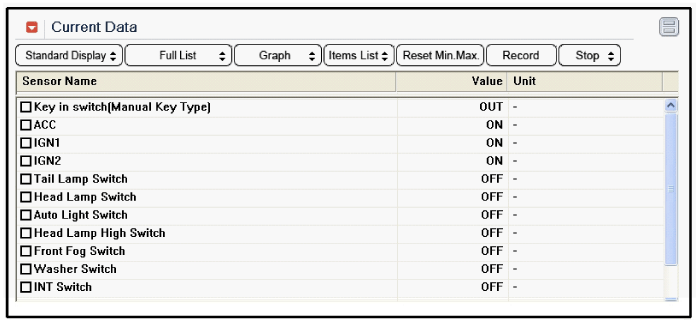
- To perform a forced actuation of BCM input factors, select "ACTUATION TEST".
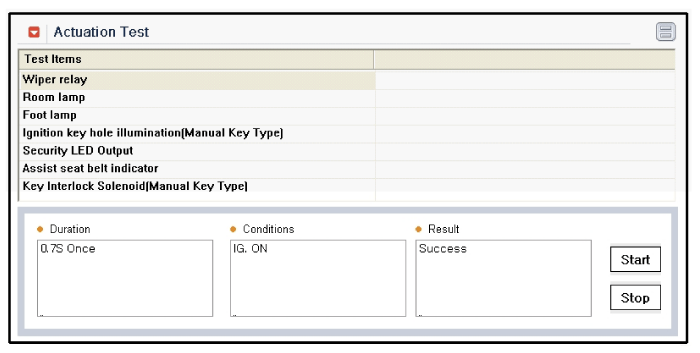
Removal
- Disconnect the negative (-) battery terminal.
- Remove the steering wheel. (Refer to Group ST - "Steering Column and Shaft")
- Remove the upper and lower steering column shrouds by removing the 3 screws.
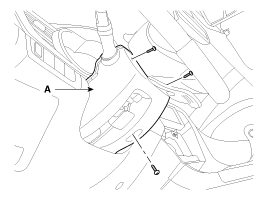
- If removal is necessary, release the wiper and washer switch lock (A) only with a tool, without removing the steering wheel and clock spring.
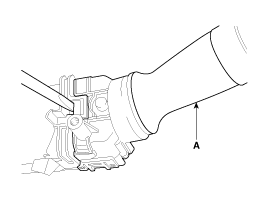
- Disconnect the light switch connector (A) and the wiper and washer switch connector (B).
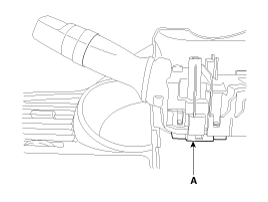
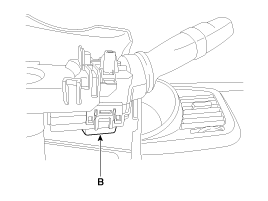
- Remove the steering wheel. (Refer to Group ST - "Steering Column and Shaft")
- Remove the clock spring. (Refer to RT group - "Airbag Module")
- Remove the multifunction switch assembly (A) after loosening the mounting screws.
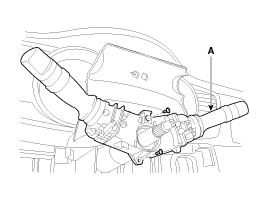
Installation
- Install the multifunction switch.
- Install the clock spring.
- Install the upper and lower steering column covers.
- Install the steering wheel.
Make sure the multifunction switch connectors are connected correctly.
Test yourself
A quick Kia Optima Hybrid Owner's Manual quiz: every answer comes with an explanation and a link to the manual page.
Was this page helpful?