Operating the Satellite Radio (Some models)
With over 130 channels, SiriusXM Satellite Radio brings you more of what you love. Get channels and channels of commercial-free music, plus sports, news, talk, entertainment and more.
Commercial-free music from nearly every genre—rock to pop, hip-hop to country, jazz, classical and more. Plus live performances and artist-dedicated channels.
Live sports Play-by-Play & Expert Talk—every NFL game, every NASCAR® race, 24/7 sports talk, college sports and more.
Exclusive entertainment, comedy and talk—The biggest names, compelling talk, hilarious comedy.
World-class news plus local traffic and weather.Sign up for SiriusXM Satellite Radio today!
NOTE
- To listen to SiriusXM, a prior subscription (fee-based) is required.
- The channels which you can receive depend on the package you subscribe to.
- Satellite radio is broadcast as Sirius, XM, and SiriusXM in the U.S.A., and Sirius and XM in Canada. In this owner’s manual, only the name SiriusXM is used.
- For traffic and weather channels, map information is not displayed and only audio broadcasts can be received.
- Call 877-447-0011 (U.S.A.)/ 877-209-0079 (Canada) to activate. For more information, visit www. siriusxm.com (U.S.A.)/www.siriusxm. ca (Canada). Satellite radio is only available in regions providing satellite radio service (some areas of the United States and Canada). Contact Authorized Mazda Dealer for details.
You must call SiriusXM to activate your service. Activation is free and takes only a few minutes.
New customers can receive a free introductory subscription with a limited term trial offer by calling 877-447-0011 (U.S.A.)/877-209-0079 (Canada) to activate.
SiriusXM service uses an ID code to identify your radio. This code is needed to activate SiriusXM service, and report any problems.
Please have the following information ready:
- Radio ID (8-digit electronic serial No.) Refer to Displaying the Radio ID (ESN)
- Valid credit card information (may not be required at initial sign-up)
Be sure you are parked outside with a clear view of open sky, you will be instructed to turn on your radio (in SiriusXM mode and tuned to channel 184 (Sirius)/1 (XM and SiriusXM)). Activation typically takes only 2—5 minutes.
Displaying the Radio ID (ESN)When channel 0 is selected, the radio ID is displayed. Use the PREVIOUS or NEXT channel buttons to select channel 0.
SiriusXM operationSelect the  icon on the home
screen to display the Entertainment screen. When  is selected, the following icons
are indicated in the bottom part of the center display.
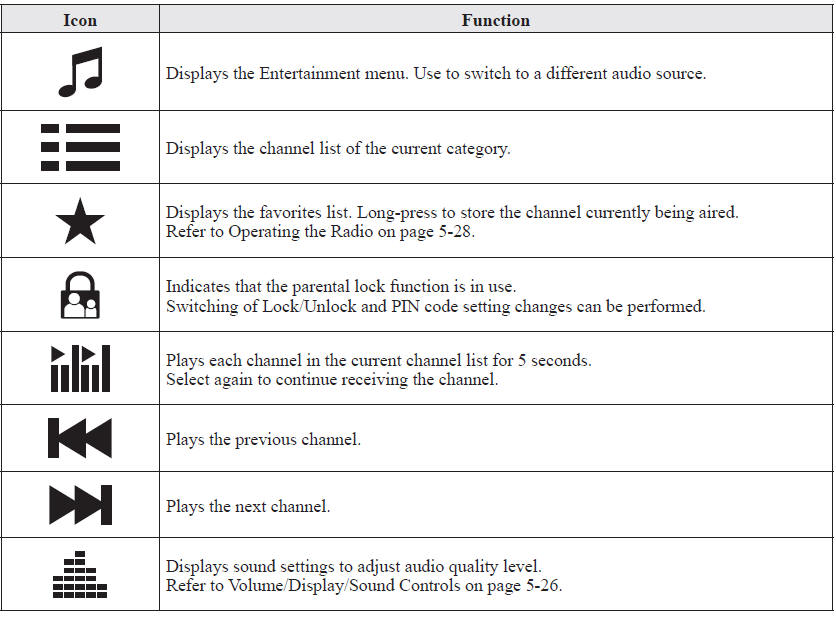
Selection from channel list
Receivable channels can be displayed on the channel list screen. You can easily select the channel you want to listen from the list. Each category can be also displayed.
1. Select the  icon to display
the channel list.
2. Select a desired channel.
(Select from category list)1. Select the  icon to display
the channel list.
2. Select  to display the category
list.
3. Select a desired category.
Parental lockIf a channel is locked, the channel is muted.
To use the parental lock function, the PIN code must be initialized first.
By using the session lock, the parental lock can be enabled or disabled during the current drive cycle (from when the ignition is switched on to switched off). When the session lock is on, the parental lock is available. When the session lock is off, the parental lock is temporarily cancelled.
When canceling the parental lock or session lock, or when changing the PIN code, PIN code input is required.
PIN code resetIf the registered code has been forgotten, reset the code to the default [0000] code.
1. Select the  icon.
2. If the selected channel is locked, input the PIN code to cancel the parental lock temporarily.
3. Select  .
4. Input the default code [0000] using the number buttons.
5. Select  .
6. Input the new PIN code using the number buttons.
7. Select  .
Test yourself
A quick Mazda 6 quiz: every answer comes with an explanation and a link to the manual page.