Cruise Control
With cruise control, you can set and automatically maintain any speed of more than about 30 km/h.
WARNING:Do not use the cruise control under the following conditions:
Using the cruise control under the following conditions is dangerous and could result in loss of vehicle control.
 Hilly terrain Steep inclines Heavy or unsteady traffic Slippery or winding roads Similar restrictions that require
inconsistent speed

The indicator light has two colors.
Cruise Main Indicator Light (Amber)The indicator light illuminates amber when the ON/OFF switch is pressed and the cruise control system is activated.
Cruise Set Indicator Light (Green)The indicator light illuminates green when a cruising speed has been set.
Activation/Deactivation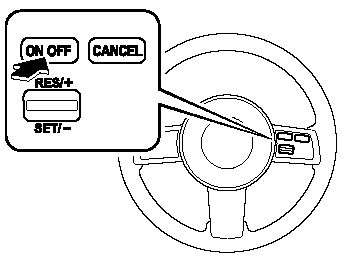
To activate the system, press the ON/OFF switch. The cruise main indicator light illuminates. To deactivate the system, press the switch again.
The cruise main indicator light turns off.
WARNING:Keep the ON/OFF switch off when cruise control is not in use: Leaving the ON/OFF switch on when not using the cruise control is dangerous as you may hit one of the other buttons and put the vehicle in cruise control unexpectedly. This could result in loss of vehicle control. To Set Speed 1. Activate the cruise control system by pressing the ON/OFF switch.
2. Accelerate to the desired speed, which must be more than 30 km/h.
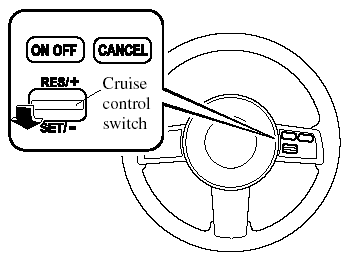
3. Press down the cruise control SET/- switch and release it at the speed you want. Release the accelerator simultaneously.
Do not continue to hold the switch. Until you release it, speed will continue to drop (unless you continue to accelerate) and you'll miss the desired speed.
NOTE:- On a steep grade, the vehicle may momentarily slow down while ascending, or speed up while descending.
- Cruise control will turn off if vehicle speed drops below 30 km/h when cruise is activated, such as when climbing a steep grade.
To Increase Cruising SpeedFollow either of these procedures.
To increase speed using cruise control switch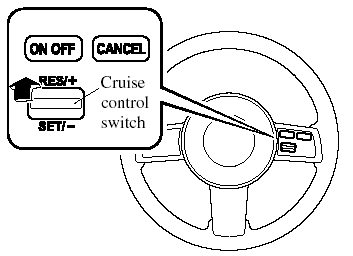
Press up the cruise control RES/+ switch and hold it. Your vehicle will accelerate. Release the switch at the speed you want.
Your vehicle has a tap-up feature that allows you to increase your current speed in increments of 1,6 km/h by a momentary tap of the cruise control RES/ + switch. Multiple taps will increase your vehicle speed 1,6 km/h for each tap.
To increase speed using accelerator pedal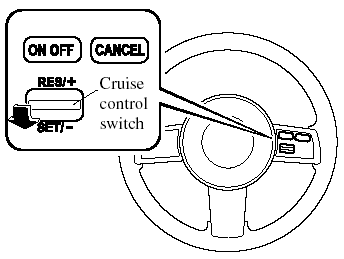
Depress the accelerator pedal to accelerate to the desired speed.
Press down the cruise control SET/- switch and release it immediately.
NOTE:Accelerate if you want to speed up temporarily when the cruise control is on. Greater speed will not interfere with or change the set speed.
Take your foot off the accelerator to return to the set speed.
To Decrease Cruising Speed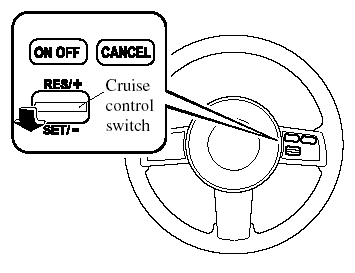
Press down the cruise control SET/- switch and hold it. The vehicle will gradually slow. Release the switch at the speed you want.
Your vehicle has a tap-down feature that allows you to decrease your current speed in decrements of 1,6 km/h by a momentary tap of the cruise control SET/- switch. Multiple taps will decrease your vehicle speed 1,6 km/h for each tap.
To Resume Cruising Speed at More Than 30 km/h
If some other method besides the ON/ OFF switch was used to cancel cruising speed (such as applying the brake pedal). and the system is still activated, the most recent set speed will automatically resume when the cruise control RES/+ switch is pressed up.
If vehicle speed is below 30 km/h, increase the vehicle speed up to 30 km/h or more and press up the cruise control RES/+ switch.
To Cancel To cancel the system, use one of these methods:- Press the ON/OFF switch. - Slightly depress the brake pedal.
- Depress the clutch pedal (Manual transmission only).
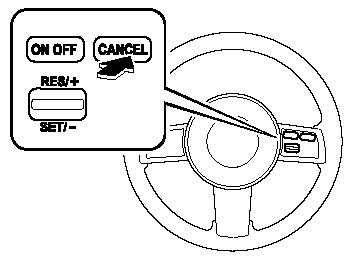
- Press the CANCEL switch.
The system turns off when the ignition is switched off.
NOTE:Cruise control will cancel at about 15 km/h below the preset speed (such as may happen when climbing a long, steep grade).
Test yourself
A quick Mazda MX-5 quiz: every answer comes with an explanation and a link to the manual page.