Monitor, climate, audio, phone and voice recognition systems
Receiving a call
In this manual: Monitor, climate, audio, phone and voice recognition systems
~1min read
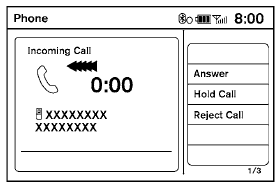
When you hear a phone ring, the display will change to phone mode. To receive a call, follow one of the procedures listed below.
a. Select the “Answer” key on the display.
b. Press the phone  button on the steering wheel switches.
There are some options available when receiving a call. Select one of the following displayed on the screen.
Answer:
Accept an incoming call to talk.
Hold Call:
Put an incoming call on hold.
Reject Call:
Reject an incoming call.
To finish the call, follow one of the procedures listed below:
a. Select the “Reject Call” key on the display.
b. Press and hold the phone button on the steering wheel switches.
Test yourself
A quick Nissan Altima quiz: every answer comes with an explanation and a link to the manual page.
Was this page helpful?