Bluetooth settings
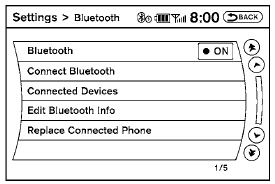
To set up the Bluetooth Hands-Free Phone System to your preferred settings, press the SETTING button on the instrument panel and select the “Bluetooth” key on the display. Bluetooth:
Turn the Bluetooth system on or off. Connect Bluetooth:
See “Connecting procedure” in this section for more information about connecting a phone. Connected Devices:
Display a list of the Bluetooth devices connected to the system.
Edit Bluetooth Info:
Check information about the device name, device address and device PIN.
Replace Connected Phone:
Replace the phone currently connected to the system. This option allows you to keep any voicetags that were recorded using the previous phone.
Test yourself
A quick Nissan Altima quiz: every answer comes with an explanation and a link to the manual page.