Monitor, climate, audio, phone and voice recognition systems
Call volume
In this manual: Monitor, climate, audio, phone and voice recognition systems
~1min read
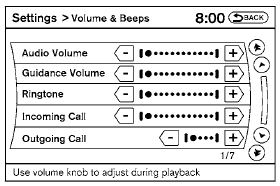
Adjusting the incoming or outgoing call volume may improve clarity if reception between callers is unclear.
● Incoming call—adjusting this setting allows you to hear a difference in volume.
● Outgoing call—adjusting this setting allows the person you are talking with to hear a difference in volume.
To access the settings, press the SETTING button, then select “Volume & Beeps”.
You can also adjust the volume of an incoming voice during a call by pushing the volume control switch on the steering wheel or by turning the volume control knob on the instrument panel.
Test yourself
A quick Nissan Altima quiz: every answer comes with an explanation and a link to the manual page.
Was this page helpful?