Monitor, climate, audio, phone and voice recognition systems
Activating Alternate Command Mode
In this manual: Monitor, climate, audio, phone and voice recognition systems
~1min read
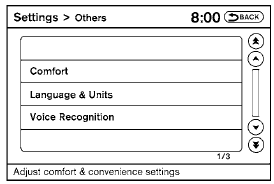
1. Press the SETTING button on the instrument panel.
2. Select the “Others” key on the display.
3. Select the “Voice Recognition” key.
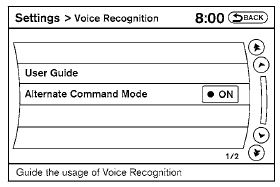
4. Select the “Alternate Command Mode” key.
5. The confirmation message is displayed on the screen. Select the “OK” key to activate the Alternate Command Mode.
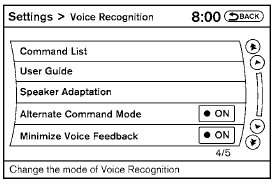
6. Alternate Command Mode is activated and the setting menu is expanded to include the Alternate Command Mode options. See “Settings menu” in this section for an explanation of the options.
Test yourself
A quick Nissan Altima quiz: every answer comes with an explanation and a link to the manual page.
Was this page helpful?