Door & Lock type 2
Intelligent key battery
In this manual: Door & Lock type 2
~1min read
Removal and Installation 1. Release the lock knob at the back of the Intelligent Key and remove the mechanical key.
• Do not touch the circuit board or battery terminal.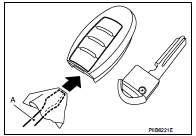
• When replacing battery, keep dirt, grease, and other foreign materials off the electrode contact area.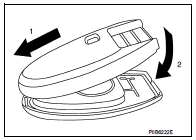
2. Insert a flat-blade screwdriver (A) wrapped with a cloth into the slit of the corner and twist it to separate the upper part from the lower part.
CAUTION:• Do not touch the circuit board or battery terminal.
• The key fob is water-resistant. However, if it does get wet, immediately wipe it dry.
3. Replace the battery with new one.
Battery replacement :Coin-type lithium battery (CR2025)
4. Align the tips of the upper and lower parts, and then push them together until it is securely closed.
CAUTION:• When replacing battery, keep dirt, grease, and other foreign materials off the electrode contact area.
• After replacing the battery, check that all Intelligent Key functions work normally.
Was this page helpful?